MR-03/12/25-LB/LS
1. Introduction
1.1 What is LoRaWAN Microwave Radar Distance Sensor
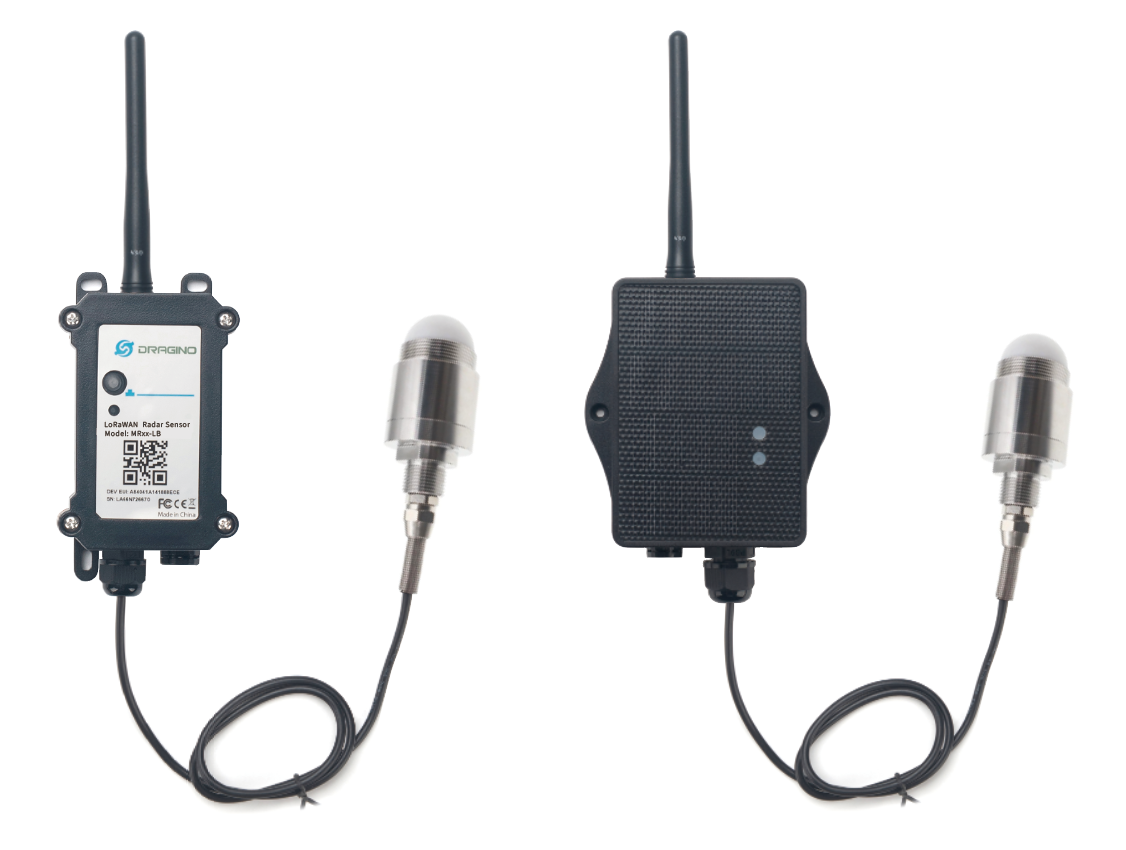
The Dragino MR-03/12/25-LB/LS is a LoRaWAN Microwave Radar distance sensor. It uses 80Ghz Microwave to detect the distance between sensor and different objects. Compare vs ultrasonic or Lidar measurement method, Microwave Radar is more reliable for condensation / dusty environment. It can sense correct distance even there is water or thick dust on top of the sensor.
The MR-03/12/25-LB/LS can be applied to scenarios such as horizontal distance measurement, parking management system, object proximity and presence detection, intelligent trash can management system, robot obstacle avoidance, automatic control, sewer, etc.
The LoRa wireless technology used in MR-03/12/25-LB/LS allows device to send data and reach extremely long ranges at low data-rates. It provides ultra-long range spread spectrum communication and high interference immunity whilst minimizing current consumption.
MR-03/12/25-LB/LS supports BLE configure and wireless OTA update which make user easy to use.
MR-03/12/25-LB/LS is powered by 8500mAh Li-SOCI2 battery or solar powered + Li-ion battery , it is designed for long term use up to 5 years.
Each MR-03/12/25-LB/LS is pre-load with a set of unique keys for LoRaWAN registrations, register these keys to local LoRaWAN server and it will auto connect after power on.
1.2 Features
- LoRaWAN 1.0.3 Class A
- Ultra-low power consumption
- 80GHz Microwave Radar for distance detection
- Measure Range : 3m: 200 ~ 3000mm; 12m: 200 ~ 12000mm; 25m: 200 ~ 25000mm
- Accuracy: ± 20mm
- Resolution: 1mm
- Measurement Angle : 7.6 degrees horizontal and 7.6 degrees vertical
- Monitor Battery Level
- Support Bluetooth v5.1 and LoRaWAN remote configure
- Support wireless OTA update firmware
- AT Commands to change parameters
- Uplink on periodically
- 8500mAh Li/SOCl2 Battery (MR-XX-LB)
- Solar panel + 3000mAh Li-ion battery (MR-XX-LS)
1.3 Specification
Common DC Characteristics:
- Supply Voltage: Built-in Battery , 2.5v ~ 3.6v
- Operating Temperature: -40 ~ 85°C
Radar probe specification:
- Measuring Method: FMCW
- Frequency: 80 GHz
- Measure Range : 3m: 200 ~ 3000mm; 12m: 200 ~ 12000mm; 25m: 200 ~ 25000mm
- Accuracy: ± 20mm
- Resolution: 1mm
- Measurement Angle : 7.6 degrees horizontal and 7.6 degrees vertical
LoRa Spec:
- Frequency Range, Band 1 (HF): 862 ~ 1020 Mhz
- Max +22 dBm constant RF output vs.
- RX sensitivity: down to -139 dBm.
- Excellent blocking immunity
Battery:
- Li/SOCI2 un-chargeable battery
- Capacity: 8500mAh
- Self-Discharge: <1% / Year @ 25°C
- Max continuously current: 130mA
- Max boost current: 2A, 1 second
Power Consumption
- Sleep Mode: 5uA @ 3.3v
- LoRa Transmit Mode: 125mA @ 20dBm, 82mA @ 14dBm
1.4 Applications
- Horizontal distance measurement
- Liquid level measurement
- Parking management system
- Object proximity and presence detection
- Intelligent trash can management system
- Robot obstacle avoidance
- Automatic control
- Sewer
- Bottom water level monitoring
1.5 Installation
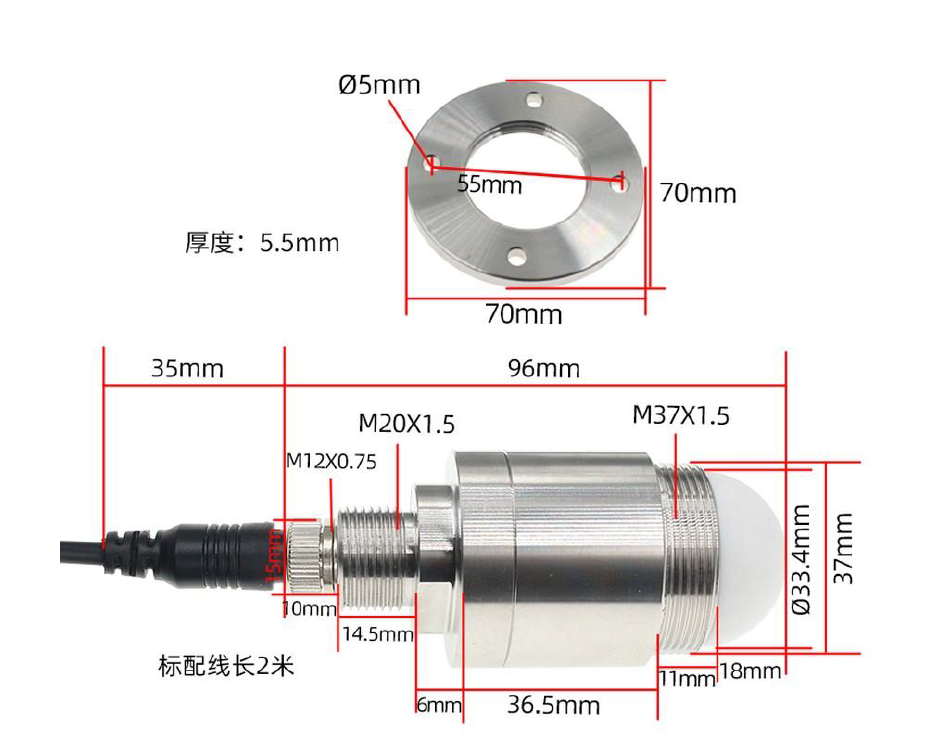
Sensor measure direction and angle is as below. When install the sensor, please make sure the sensor direct to object.
1.6 Sleep mode and working mode
Deep Sleep Mode: Sensor doesn't have any LoRaWAN activate. This mode is used for storage and shipping to save battery life.
Working Mode: In this mode, Sensor will work as LoRaWAN Sensor to Join LoRaWAN network and send out sensor data to server. Between each sampling/tx/rx periodically, sensor will be in IDLE mode), in IDLE mode, sensor has the same power consumption as Deep Sleep mode.
1.7 Button & LEDs
| Behavior on ACT | Function | Action |
|---|---|---|
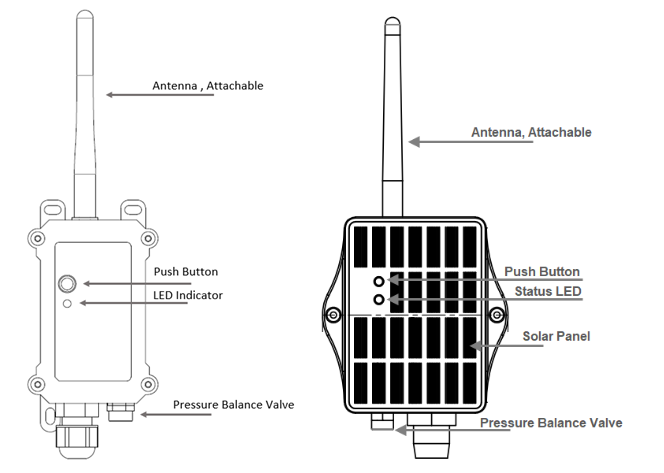
 1~3s 1~3s | Send an uplink | If sensor is already Joined to LoRaWAN network, sensor will send an uplink packet, blue led will blink once. Meanwhile, BLE module will be active and user can connect via BLE to configure device. |
| >3s | Active Device | Green led will fast blink 5 times, device will enter OTA mode for 3 seconds. And then start to JOIN LoRaWAN network. Green led will solidly turn on for 5 seconds after joined in network. Once sensor is active, BLE module will be active and user can connect via BLE to configure device, no matter if device join or not join LoRaWAN network. |
 x5 x5 | Deactivate Device | Red led will solid on for 5 seconds. Means device is in Deep Sleep Mode. |
1.8 BLE connection
MR-03/12/25-LB/LS support BLE remote configure.
BLE can be used to configure the parameter of sensor or see the console output from sensor. BLE will be only activate on below case:
- Press button to send an uplink
- Press button to active device.
- Device Power on or reset.
If there is no activity connection on BLE in 60 seconds, sensor will shut down BLE module to enter low power mode.
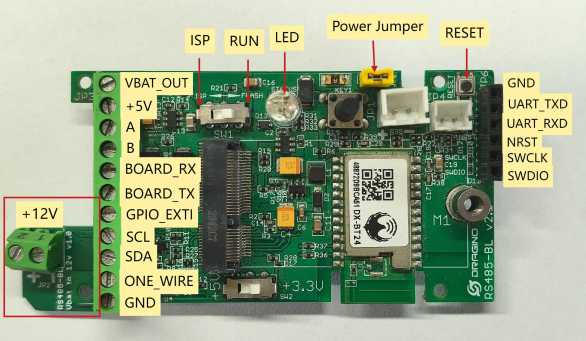
1.9 Pin Definition
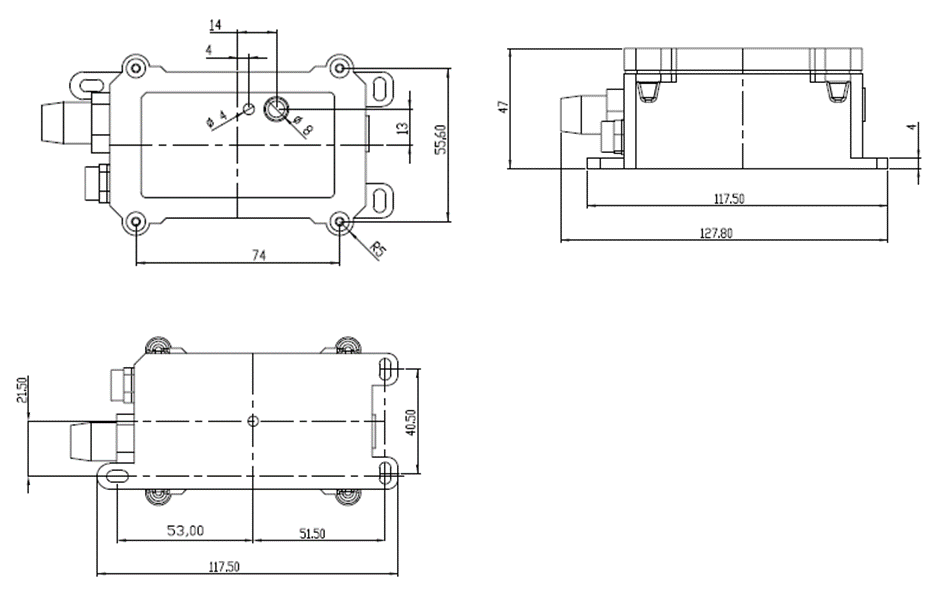
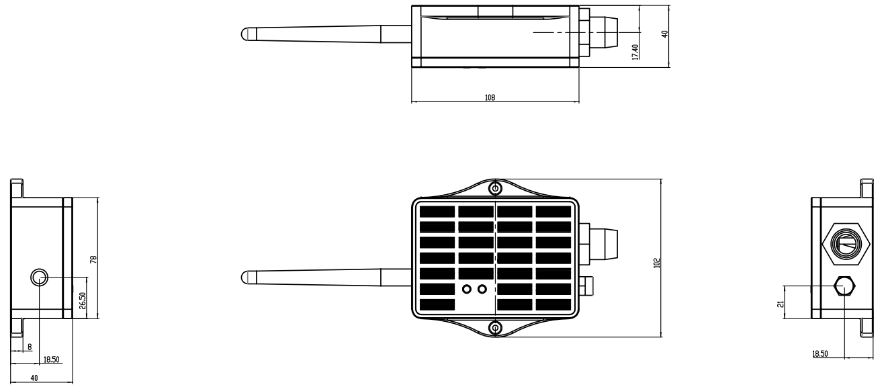
1.10 Mechanical
1.10.1 for LB version
1.10.2 for LS version
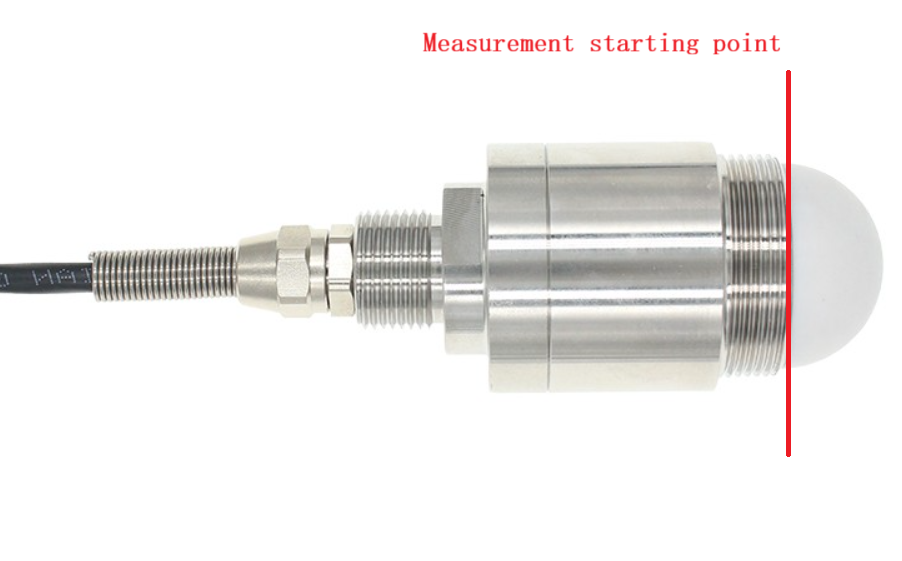
1.11 Measure starting point
2. Configure MR-03/12/25-LB/LS to connect to LoRaWAN network
2.1 How it works
The MR-03/12/25-LB/LS is configured as LoRaWAN OTAA Class A mode by default. It has OTAA keys to join LoRaWAN network. To connect a local LoRaWAN network, you need to input the OTAA keys in the LoRaWAN IoT server and press the button to activate theMR-03/12/25-LB/LS. It will automatically join the network via OTAA and start to send the sensor value. The default uplink interval is 20 minutes.
2.2 Quick guide to connect to LoRaWAN server (OTAA)
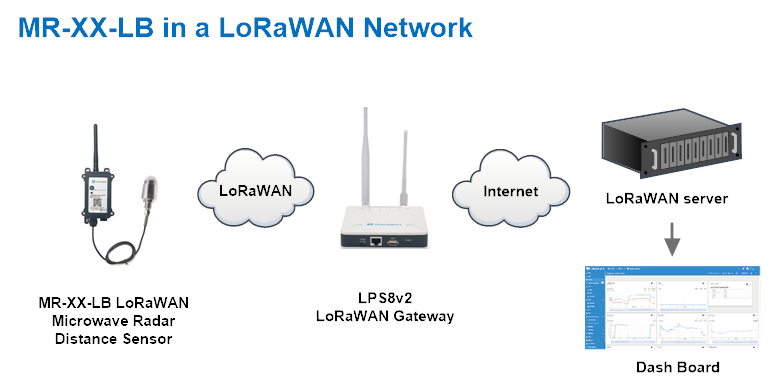
Following is an example for how to join the TTN v3 LoRaWAN Network. Below is the network structure; we use the LPS8v2 as a LoRaWAN gateway in this example.
The LPS8v2 is already set to connected to TTN network , so what we need to now is configure the TTN server.
Step 1: Create a device in TTN with the OTAA keys from MR-03/12/25-LB/LS.
Each MR-03/12/25-LB/LS is shipped with a sticker with the default device EUI as below:
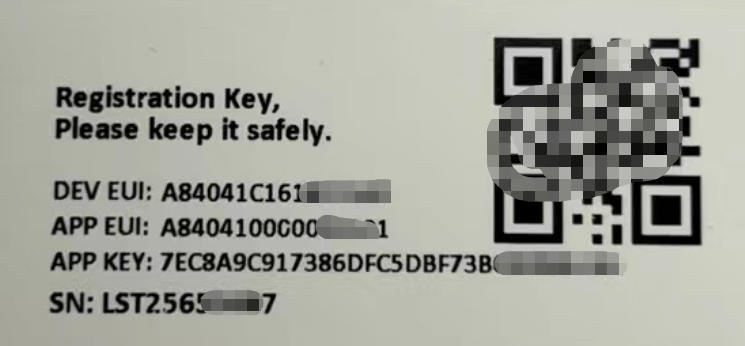
You can enter this key in the LoRaWAN Server portal. Below is TTN screen shot:
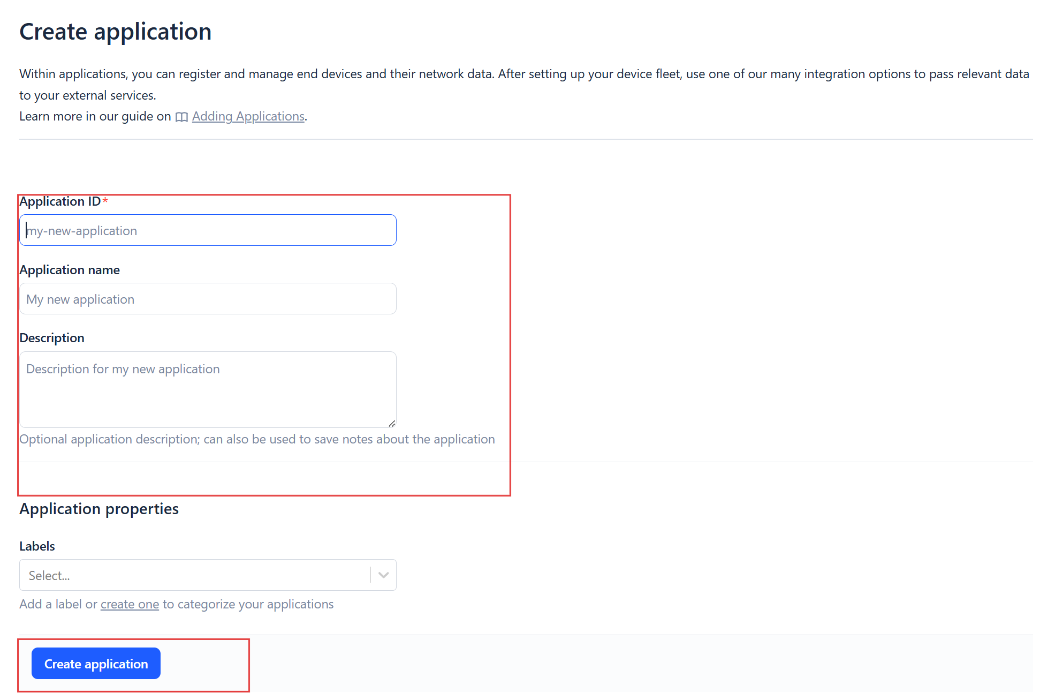
Create the application.

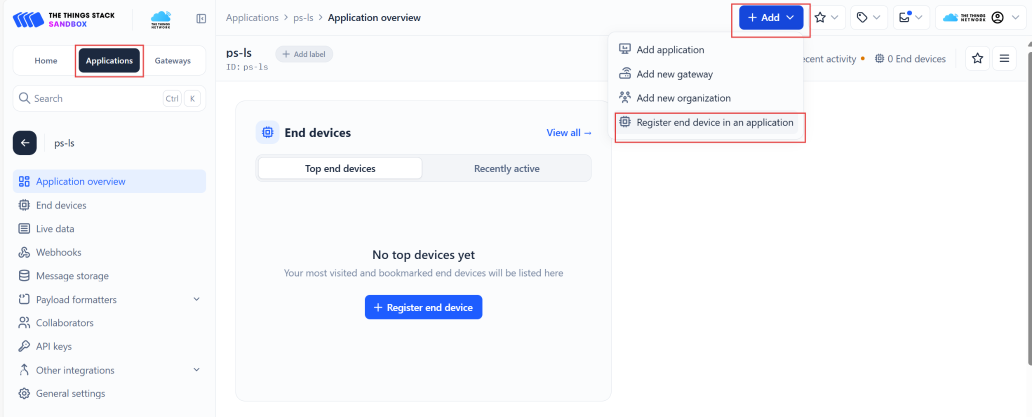
Add devices to the created Application.
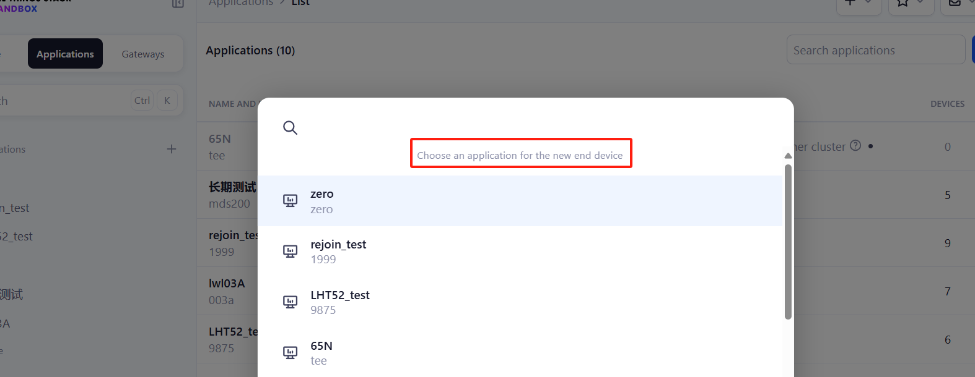
Enter end device specifics manually.
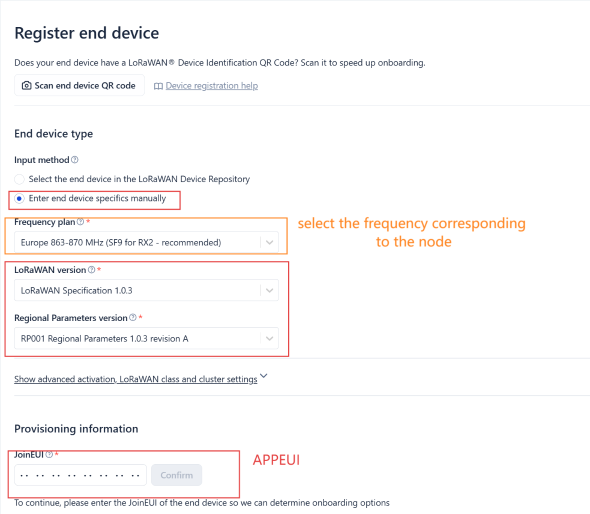
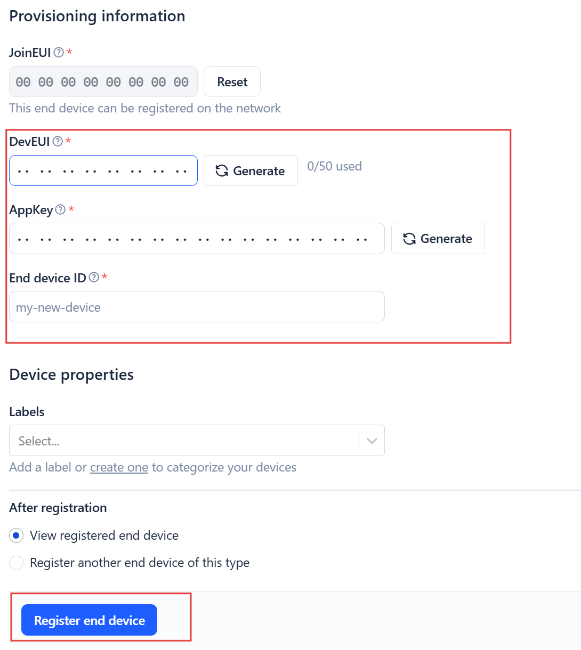
Add DevEUI and AppKey. Customize a platform ID for the device.
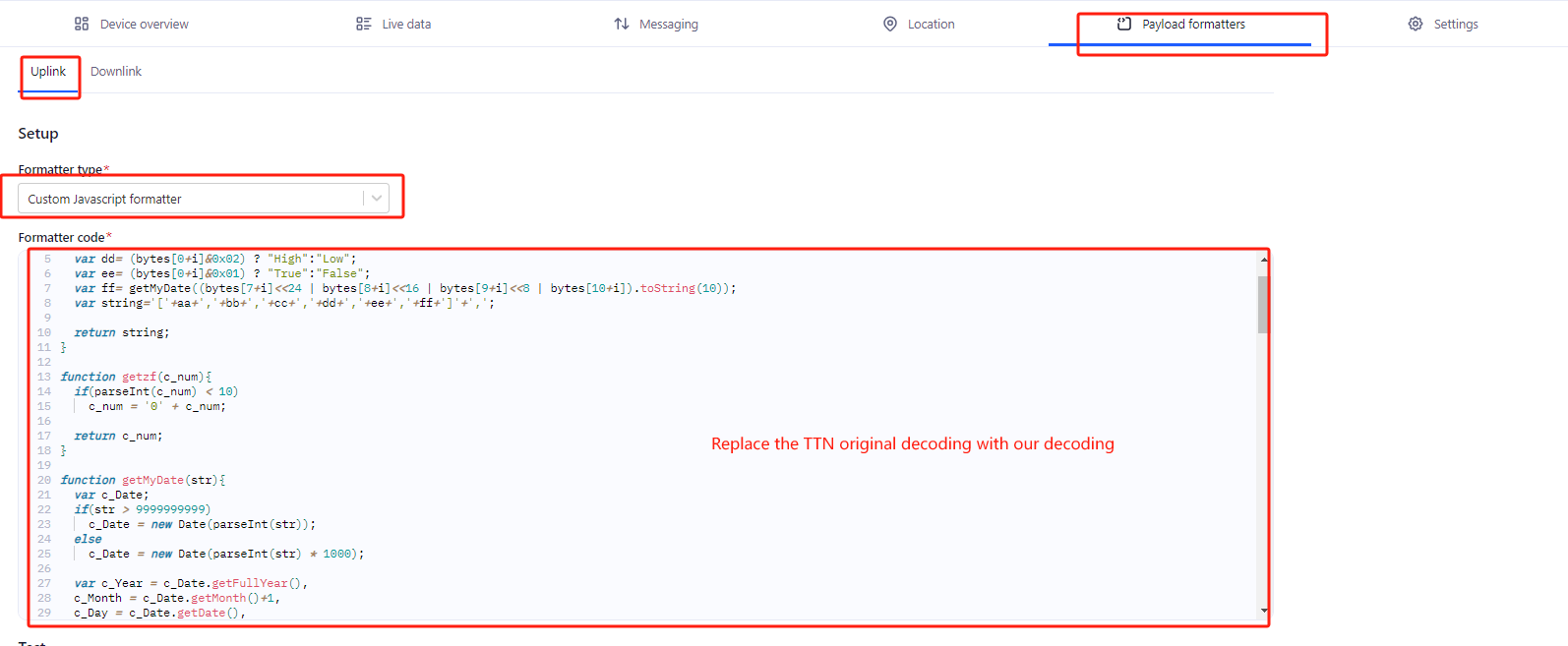
Step 2: Add decoder.
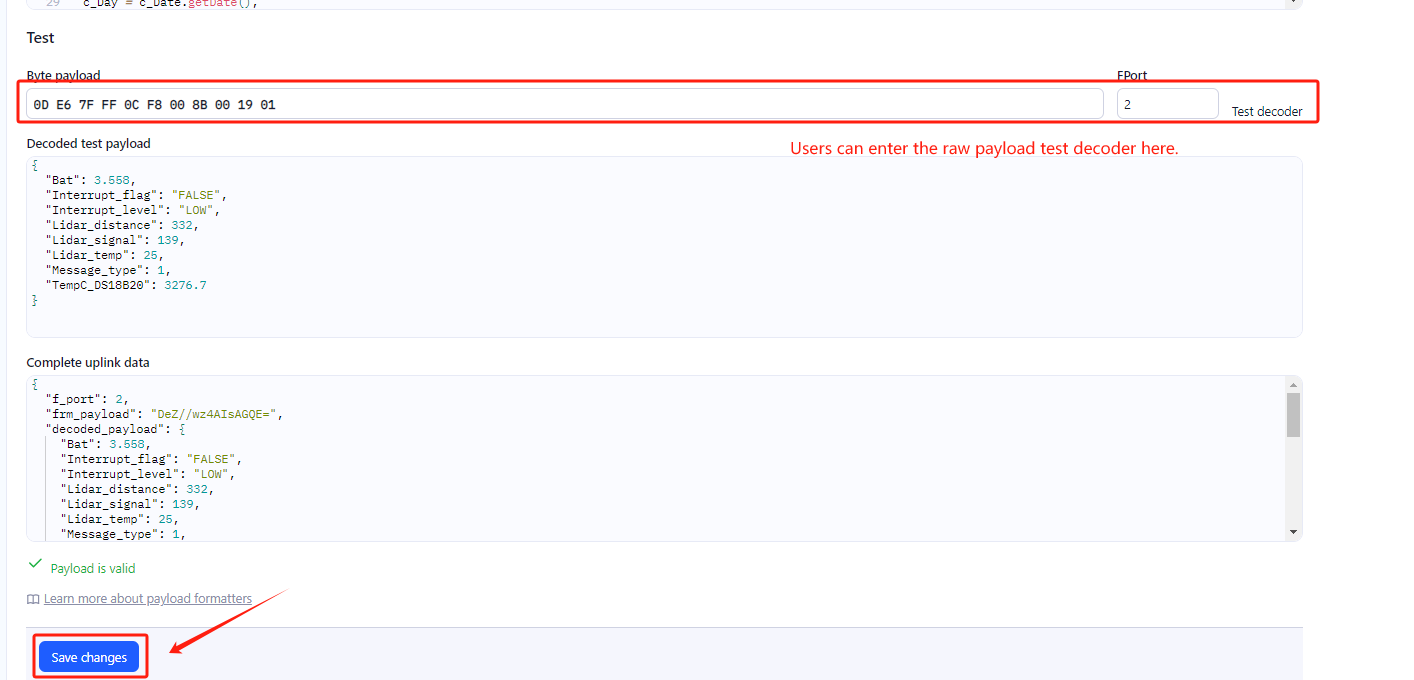
In TTN, user can add a custom payload so it shows friendly reading.
Click this link to get the decoder: https://github.com/dragino/dragino-end-node-decoder/tree/main/
Below is TTN screen shot:
Step 3: Activate on MR-03/12/25-LB/LS
Press the button for 5 seconds to activate the MR-03/12/25-LB/LS.
Green led will fast blink 5 times, device will enter OTA mode for 3 seconds. And then start to JOIN LoRaWAN network. Green led will solidly turn on for 5 seconds after joined in network.
After join success, it will start to upload messages to TTN and you can see the messages in the panel.
2.3 Uplink Payload
Uplink payloads have two types:
-
Distance Value: Use FPORT=2
-
Other control commands: Use other FPORT fields.
The application server should parse the correct value based on FPORT settings.
2.3.1 Device Status, FPORT=5
Include device configure status. Once MR-03/12/25-LB/LS Joined the network, it will uplink this message to the server.
Users can also use the downlink command (0x26 01) to ask MR-03/12/25-LB/LS to resend Device Status.
| Device Status (FPORT=5) | ||||||
|---|---|---|---|---|---|---|
| Size(bytes) | 1 | 2 | 1 | 1 | 2 | |
| Value | Sensor Model | Firmware Version | Frequency Band | Sub-band | BAT |
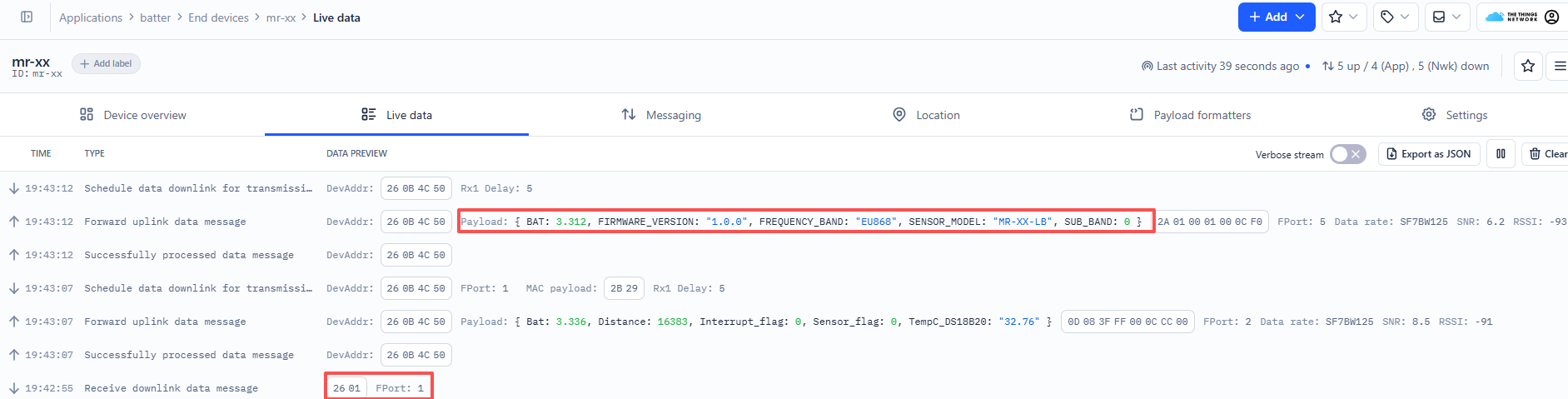
Sensor Model: For MR-03/12/25-LB/LS, this value is 0x2A
Firmware Version: 0x0100, Means: v1.0.0 version
Frequency Band:
- 0x01: EU868
- 0x02: US915
- 0x03: IN865
- 0x04: AU915
- 0x05: KZ865
- 0x06: RU864
- 0x07: AS923
- 0x08: AS923-1
- 0x09: AS923-2
- 0x0a: AS923-3
- 0x0b: CN470
- 0x0c: EU433
- 0x0d: KR920
- 0x0e: MA869
Sub-Band:
- AU915 and US915: value 0x00 ~ 0x08
- CN470: value 0x0B ~ 0x0C
- Other Bands: Always 0x00
Battery Info:
- Check the battery voltage.
- Ex1: 0x0B45 = 2885mV
- Ex2: 0x0B49 = 2889mV
2.3.2 Distance, Uplink FPORT=2
MR-03/12/25-LB/LS will send this uplink after Device Status once join the LoRaWAN network successfully. And MR-03/12/25-LB/LS will:
- periodically send this uplink every 1 hour (TDC time), this interval can be changed.
- send this uplink while there is interrupt event.
| Size(bytes) | 2 | 2 | 1 | 2 | 1 |
|---|---|---|---|---|---|
| Value | BAT | Distance (unit: mm) | Digital Interrupt (Optional) | Temperature (Optional ) | Sensor Flag |

Battery
Sensor Battery Level.
Ex1: 0x0CC6 = 3270mV
Ex2: 0x0B49 = 2889mV
Distance
Measure distance. The detection range comprises three measurement ranges:
MR-03: 200 mm to 3000 mm;
MR-12: 200 mm to 12000 mm;
MR-25: 200 mm to 25000 mm.
For example, if the data you get from the register is 0x0B 0x05, the distance between the sensor and the measured object is** **
00CB(H) = 200 (D) = 200 mm.
- If the sensor value is 0x0000, it means system doesn't detect sensor.
- If the sensor value equals 0x00C8 (200 mm), the sensor value is invalid. All values ≤ 200 mm will be set to 0x00C8 (200 mm), indicating the value is invalid
Interrupt Pin
This data field shows if this packet is generated by interrupt or not. Click here for the hardware and software set up.
Example:
0x00: Normal uplink packet.
0x01: Interrupt Uplink Packet.
TempC_DS18B20
Example:
If payload is: 0105H: (0105 & 8000 == 0), temp = 0105H /10 = 26.1 degree
If payload is: FF3FH : (FF3F & 8000 == 1) , temp = (FF3FH - 65536)/10 = -19.3 degrees.
If payload is: 0CCCH: This indicates that the device has not detected DS18B20 data.
(FF3F & 8000:Judge whether the highest bit is 1, when the highest bit is 1, it is negative)
Sensor Flag
0x01: Detect Ultrasonic Sensor
0x00: No Ultrasonic Sensor
2.3.4 Decoder in TTN V3
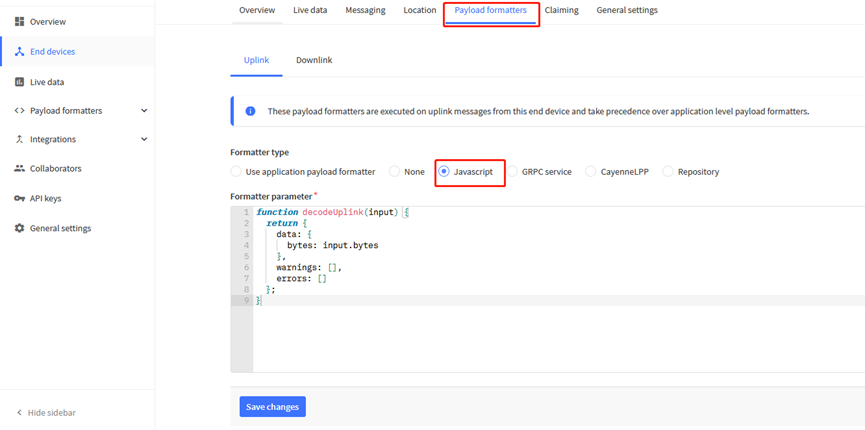
Please check the decoder from this link: https://github.com/dragino/dragino-end-node-decoder/tree/main/MRxx_LB
2.4 Uplink Interval
The MR-03/12/25-LB/LS by default uplink the sensor data every 20 minutes. User can change this interval by AT Command or LoRaWAN Downlink Command. See this link: Change Uplink Interval
2.5 Show Data in DataCake IoT Server
DATACAKE provides a human friendly interface to show the sensor data, once we have data in TTN, we can use DATACAKE to connect to TTN and see the data in DATACAKE. Below are the steps:
Step 1: Be sure that your device is programmed and properly connected to the network at this time.
Step 2: To configure the Application to forward data to DATACAKE you will need to add integration. To add the DATACAKE integration, perform the following steps:
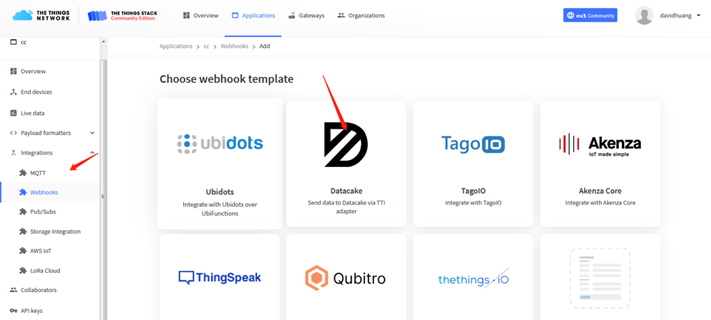
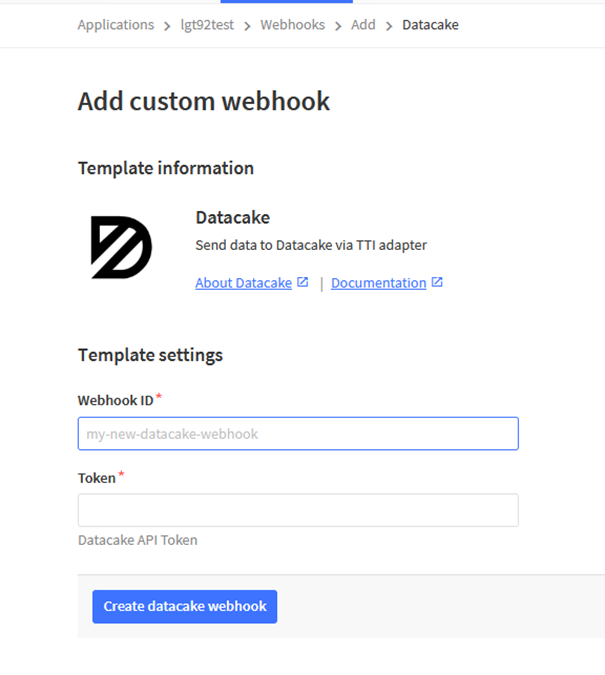
Step 3: Create an account or log in Datacake.
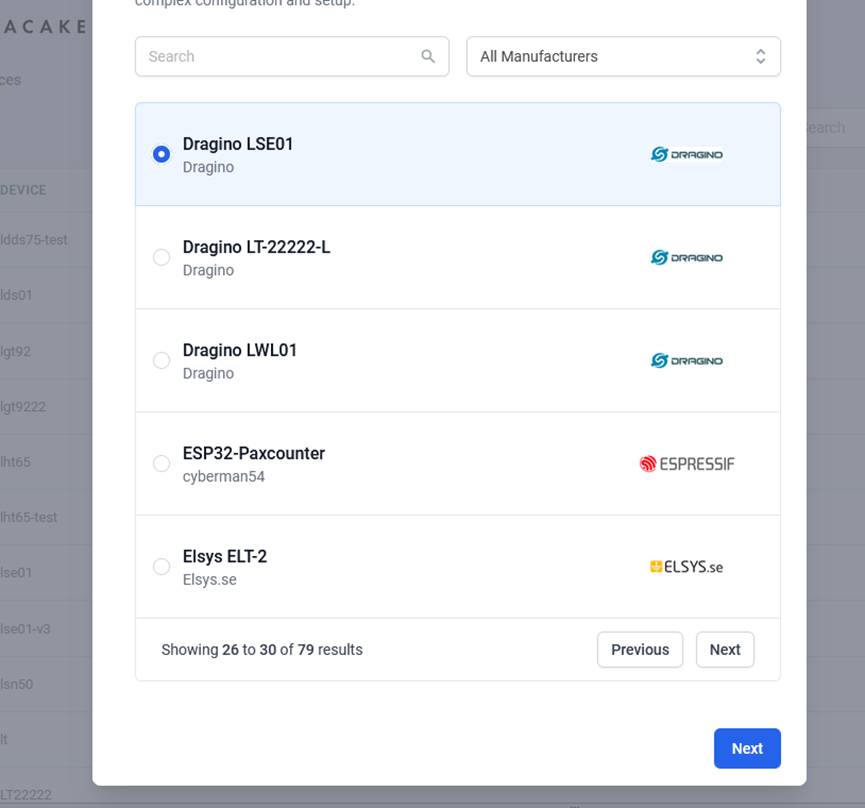
Step 4: Search the MR-03/12/25-LB/LS and add DevEUI.
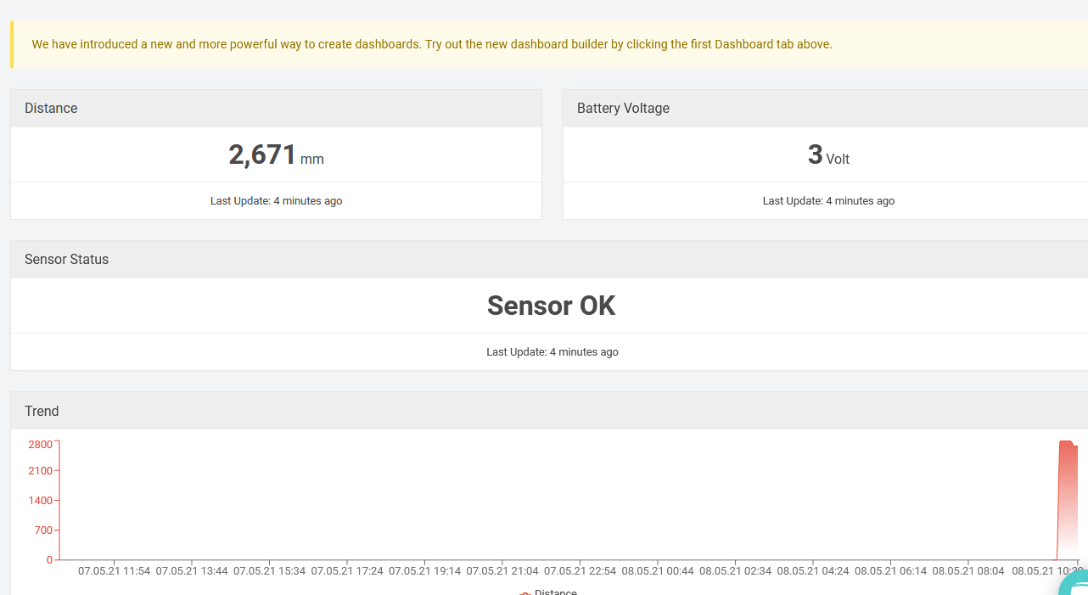
After added, the sensor data arrive TTN V3, it will also arrive and show in Datacake.
2.6 Datalog Feature
Datalog Feature is to ensure IoT Server can get all sampling data from Sensor even if the LoRaWAN network is down. For each sampling, MR-03/12/25-LB/LS will store the reading for future retrieving purposes.
2.6.1 How datalog works
MR-03/12/25-LB/LS will wait for ACK for every uplink, when there is no LoRaWAN network,MR-03/12/25-LB/LS will mark these records with non-ack messages and store the sensor data, and it will send all messages (10s interval) after the network recovery.
a) MR-03/12/25-LB/LS will do an ACK check for data records sending to make sure every data arrive server.
b) MR-03/12/25-LB/LS will send data in CONFIRMED Mode, but MR-03/12/25-LB/LS won't re-transmit the packet if it doesn't get ACK, it will just mark it as a NONE-ACK message. In a future uplink if MR-03/12/25-LB/LS gets a ACK, MR-03/12/25-LB/LS will consider there is a network connection and resend all NONE-ACK messages.
2.6.2 Enable Datalog
User need to make sure below two settings are enable to use datalog;
- SYNCMOD=1(Default) to enable sync time via LoRaWAN MAC command, click here (AT+SYNCMOD) for detailed instructions.
- PNACKMD=1 to enable datalog feature, click here (AT+PNACKMD) for detailed instructions.
Once MR-03/12/25-LB/LS Joined LoRaWAN network, it will send the MAC command (DeviceTimeReq) and the server will reply with (DeviceTimeAns) to send the current time to MR-03/12/25-LB/LS. If MR-03/12/25-LB/LS fails to get the time from the server, MR-03/12/25-LB/LS will use the internal time and wait for next time request (AT+SYNCTDC to set the time request period, default is 10 days).
Note: LoRaWAN Server need to support LoRaWAN v1.0.3(MAC v1.0.3) or higher to support this MAC command feature, Chirpstack,TTN V3 v3 and loriot support but TTN V3 v2 doesn't support. If server doesn't support this command, it will through away uplink packet with this command, so user will lose the packet with time request for TTN V3 v2 if SYNCMOD=1.
2.6.3 Unix TimeStamp
MR-03/12/25-LB/LS uses Unix TimeStamp format based on

User can get this time from link: https://www.epochconverter.com/ :
Below is the converter example
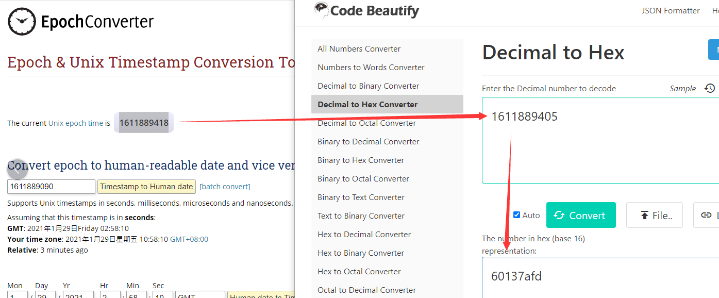
So, we can use AT+TIMESTAMP=1611889405 or downlink 3060137afd00 to set the current time 2021 – Jan -- 29 Friday 03:03:25
2.6.4 Poll sensor value
Users can poll sensor values based on timestamps. Below is the downlink command.
| Downlink Command to poll Open/Close status (0x31) | |||
| 1byte | 4bytes | 4bytes | 1byte |
| 31 | Timestamp start | Timestamp end | Uplink Interval |
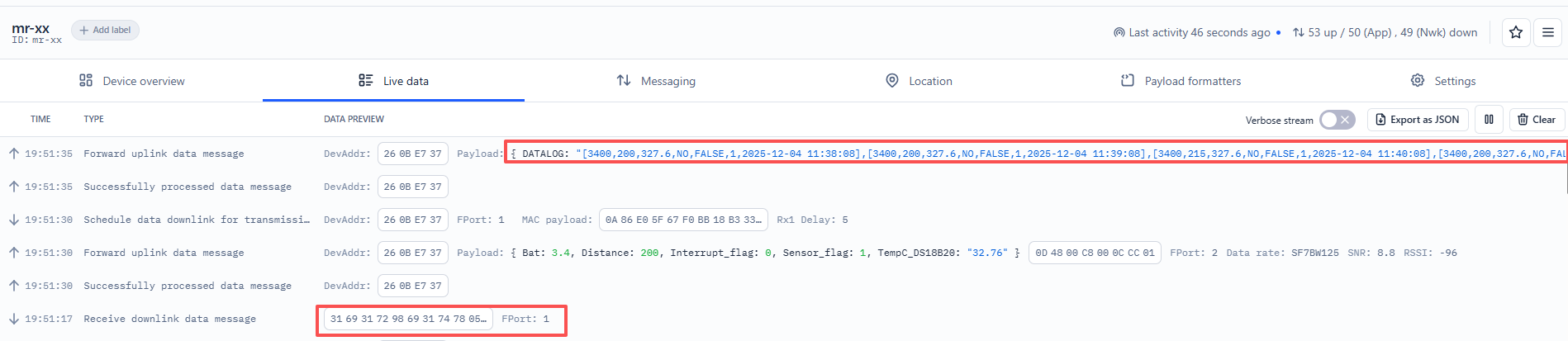
Timestamp start and Timestamp end-use Unix TimeStamp format as mentioned above. Devices will reply with all data logs during this period, using the uplink interval.
For example, downlink command 31 69317298 69317478 05
Is to check 2025/12/4 11:38:00 to 2025/12/4 11:46:00's data
Uplink Internal =5s,means MR-03/12/25-LB/LS will send one packet every 5s. range 5~255s.
2.6.5 Datalog Uplink payload (FPORT=3)
The Datalog uplinks will use below payload format.
Retrieval data payload:
| Size(bytes) | 2 | 2 | 2 | 1 | 4 |
|---|---|---|---|---|---|
| Value | BAT | Distance (unit: mm) | TempC_ DS18B20 | Poll message flag & Interrupt Flag | Unix Time Stamp |
No ACK Message: 1: This message means this payload is fromn Uplink Message which doesn't get ACK from the server before ( for PNACKMD=1 feature)
Poll Message Flag: 1: This message is a poll message reply.
-
Poll Message Flag is set to 1.
-
Each data entry is 11 bytes, to save airtime and battery, devices will send max bytes according to the current DR and Frequency bands.
For example, in US915 band, the max payload for different DR is:
a) DR0: max is 11 bytes so one entry of data
b) DR1: max is 53 bytes so devices will upload 4 entries of data (total 44 bytes)
c) DR2: total payload includes 11 entries of data
d) DR3: total payload includes 22 entries of data.
If devise doesn't have any data in the polling time. Device will uplink 11 bytes of 0
Example:
If MR-03/12/25-LB/LS has below data inside Flash:
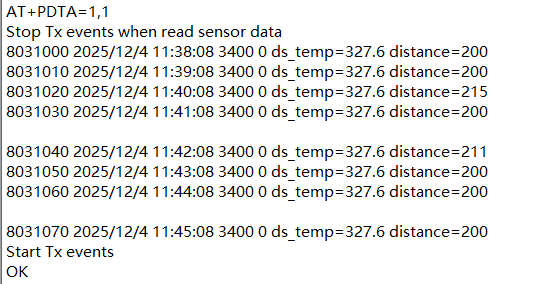
If user sends below downlink command: 31 69317298 69317478 05
Where : Start time: 6931 7298 = time 2025/12/4 11:38:00
Stop time: 6931 7478 = time 2025/12/4 11:46:00
MR-03/12/25-LB/LS will uplink this payload.
0D4800C80CCC40693172A0 0D4800C80CCC40693172DC 0D4800D70CCC4069317318 0D4800C80CCC4069317354 0D4800D30CCC4069317390 0D4800C80CCC40693173CC 0D4800C80CCC4069317408 0D4800C80CCC4069317444
Where the first 11 bytes is for the first entry:
0D 48 00 C8 0C CC 40 69 31 72 A0
BAT=0x0C D3/1000=3.283
distance=01 C8=200
TempC_DS18B20 = 0C CC = 32.76**(Unrecognized DS18B20 sensor)**
Poll message flag & Interrupt Flag=0x40,means reply data,sampling uplink message,no interrupt
Unix time is 0x69 31 72 A0=1764848288s=2025/12/4 11:38:00
2.7 Frequency Plans
The MR-03/12/25-LB/LS uses OTAA mode and below frequency plans by default. Each frequency band use different firmware, user update the firmware to the corresponding band for their country.
/docs/wiki/Configuration/end-node/frequency-band/
3. Configure MR-03/12/25-LB/LS
3.1 Configure Methods
MR-03/12/25LB/LS supports below configure method:
-
AT Command via Bluetooth Connection (Recommended): BLE Configure Instruction.
-
AT Command via UART Connection : See UART Connection.
-
LoRaWAN Downlink. Instruction for different platforms: See IoT LoRaWAN Server section.
3.2 General Commands
These commands are to configure:
-
General system settings like: uplink interval.
-
LoRaWAN protocol & radio related command.
They are same for all Dragino Devices which support DLWS-005 LoRaWAN Stack. These commands can be found on the wiki:
/docs/wiki/Configuration/end-node/at-commands-downlink/
3.3 Commands special design for MR-03/12/25-LB/LS
These commands only valid for MR-03/12/25-LB/LS, as below:
3.3.1 Set Transmit Interval Time(0x01)
Feature: Change LoRaWAN End Node Transmit Interval.
AT Command: AT+TDC
| Command Example | Function | Response |
|---|---|---|
| AT+TDC=? | Show current transmit Interval | 30000 OK the interval is 30000ms = 30s |
| AT+TDC=60000 | Set Transmit Interval | OK Set transmit interval to 60000ms = 60 seconds |
Downlink Command: 0x01
Format: Command Code (0x01) followed by 3 bytes time value.
If the downlink payload=0100003C, it means set the END Node's Transmit Interval to 0x00003C=60(S), while type code is 01.
- Example 1: Downlink Payload: 0100001E // Set Transmit Interval (TDC) = 30 seconds
- Example 2: Downlink Payload: 0100003C // Set Transmit Interval (TDC) = 60 seconds
3.3.2 Set Interrupt Mode(0x06)
Feature, Set Interrupt mode for GPIO_EXIT.
AT Command: AT+INTMOD
| Command Example | Function | Response |
|---|---|---|
| AT+INTMOD=? | Show current interrupt mode | 0 OK the mode is 0 = No interruption |
| AT+INTMOD=2 | Set Transmit Interval (Disable Interrupt), (Trigger by rising and falling edge) (Trigger by falling edge) (Trigger by rising edge) | OK |
Downlink Command: 0x06
Format: Command Code (0x06) followed by 3 bytes.
This means that the interrupt mode of the end node is set to 0x000003=3 (rising edge trigger), and the type code is 06.
Example 1: Downlink Payload: 06000000 // Turn off interrupt mode
Example 2: Downlink Payload: 06000003 // Set the interrupt mode to rising edge trigger
3.3.3 Calibration Command
Feature: When data deviates from the reference standard, users can reduce display errors by adjusting the"correction value."The correction value can be modified within the range of 0-1000. For example, if the displayed value is 100 units too low, we can correct it by adding 100 to the sampled data using this command: 01 06 00 6B 00 64 F9 FD. In the command, 100 corresponds to hexadecimal 0x64. To reduce the value, set a negative number, such as -100, which corresponds to hexadecimal FF 9C. The calculation is 100 - 65535 = 65435, converted to hexadecimal as 0x FF 9C.
AT Command:
| Command Example | Function | Response |
|---|---|---|
| AT+RSWRITE= 0106006B0064F9FD | Set the sensor's calibration value to 100. Range : no more than 10 bytes | AT+RSWRITE=0106006B0064F9FD OK return:01 06 00 6b 00 64 f9 fd |
| AT+RSWRITE= 0103006B0001F5D6 | Retrieve the current calibration value for the radar sensor | AT+RSWRITE=0103006B0001F5D6 OK return:01 03 02 00 64 b9 af |
Eg: Send command 0106006B0064F9FD to Radar Sensor
AT+RSWRITE=0106006B0064F9FD
Downlink Command:
- 0xE20106006B0064F9FD Same as: AT+RSWRITE=0106006B0064F9FD
Note:
- Unable to retrieve the calibration value for the current sensor setting via the downlink: 0103006B0001F5D6
3.3.4 Print data entries base on page
Feature: Print the sector data from start page to stop page (max is 416 pages).
AT Command: AT+PDTA
| Command Example | Function |
|---|---|
| AT+PDTA=1,1 Print page 1 to 1 | Stop Tx events when read sensor data 8031000 2025/12/4 11:38:08 3400 0 ds_temp=327.6 distance=200 8031010 2025/12/4 11:39:08 3400 0 ds_temp=327.6 distance=200 8031020 2025/12/4 11:40:08 3400 0 ds_temp=327.6 distance=215 8031030 2025/12/4 11:41:08 3400 0 ds_temp=327.6 distance=200 8031040 2025/12/4 11:42:08 3400 0 ds_temp=327.6 distance=211 8031050 2025/12/4 11:43:08 3400 0 ds_temp=327.6 distance=200 8031060 2025/12/4 11:44:08 3400 0 ds_temp=327.6 distance=200 8031070 2025/12/4 11:45:08 3400 0 ds_temp=327.6 distance=200 Start Tx events OK |
Downlink Command:
No downlink commands for feature
3.3.5 Print last few data entries
Feature: Print the last few data entries
AT Command: AT+PLDTA
| Command Example | Function |
|---|---|
| AT+PLDTA=5 Print last 5 entries | Stop Tx events when read sensor data 0001 2025/12/4 11:30:18 3400 0 ds_temp=327.6 distance=200 0002 2025/12/4 11:31:18 3400 0 ds_temp=327.6 distance=200 0003 2025/12/4 11:32:18 3400 0 ds_temp=327.6 distance=200 0004 2025/12/4 11:33:18 3400 0 ds_temp=327.6 distance=200 0005 2025/12/4 11:34:18 3400 0 ds_temp=327.6 distance=200 Start Tx events OK |
Downlink Command:
No downlink commands for feature
3.3.6 Clear Flash Record
Feature: Clear flash storage for data log feature.
AT Command: AT+CLRDTA
| Command Example | Function | Response |
|---|---|---|
| AT+CLRDTA | Clear date record | Clear all stored sensor data… OK |
Downlink Command: 0xA3
- Example: 0xA301 // Same as AT+CLRDTA
4. Battery & Power Consumption
MR-03/12/25-LB use ER26500 + SPC1520 battery pack and MR-03/12/25-LS use 3000mAh Recharable Battery with Solar Panel. See below link for detail information about the battery info and how to replace.
Battery Info & Power Consumption Analyze .
5. OTA Firmware update
User can change firmware MR-03/12/25-LB/LS to:
-
Change Frequency band/ region.
-
Update with new features.
-
Fix bugs.
Firmware and changelog can be downloaded from : Firmware download link
Methods to Update Firmware:
-
(Recommended way) OTA firmware update via wireless: /docs/wiki/Configuration/end-node/lorawan-ota-firmware/
-
Update through UART TTL interface: Instruction.
6. FAQ
6.1 What is the frequency plan for MR-03/12/25-LB/LS?
MR-03/12/25-LB/LS use the same frequency as other Dragino products. User can see the detail from this link: Introduction
6.2 Why I can't join TTN V3 in US915 / AU915 bands?
It is due to channel mapping. Please see below link: Frequency band
6.3 AT Command input doesn't work
In the case if user can see the console output but can't type input to the device. Please check if you already include the ENTER while sending out the command. Some serial tool doesn't send ENTER while press the send key, user need to add ENTER in their string.
6.4 Why is there no LED response when I press the button on the solar panel model?
If the LED does not light up when you press the button, it may be because the battery has entered protection mode.
Solution: To reactivate the battery, simply expose the solar panel to direct sunlight. For more details, please refer to: Battery Protection State (Apply to Solar Panel + Li-ion battery)
7. Order Info
Part Number: MR-XX-LB-YY or MR-XX-LS-YY
XX: Measure Range: 03: 3 meters; 12: 12 meters; 25: 25 meters.
YY: Frequency Bands, options:
- **AS923: **LoRaWAN AS923 band
- AU915: LoRaWAN AU915 band
- EU433: LoRaWAN EU433 band
- EU868: LoRaWAN EU868 band
- KR920: LoRaWAN KR920 band
- US915: LoRaWAN US915 band
- IN865: LoRaWAN IN865 band
- CN470: LoRaWAN CN470 band
8. Packing Info
Package Includes:
- MR-XX-LB or MR-XX-LS LoRaWAN Microwave Radar Distance Sensor x 1
Dimension and weight:
-
Device Size: cm
-
Device Weight: g
-
Package Size / pcs : cm
-
Weight / pcs : g
9. Support
-
Support is provided Monday to Friday, from 09:00 to 18:00 GMT+8. Due to different timezones we cannot offer live support. However, your questions will be answered as soon as possible in the before-mentioned schedule.
-
Provide as much information as possible regarding your enquiry (product models, accurately describe your problem and steps to replicate it etc) and send a mail to Support@dragino.cc.
0