POM01-L
1. Introduction
1.1 What is POM01-L LoRaWAN Temperature & Humidity Sensor
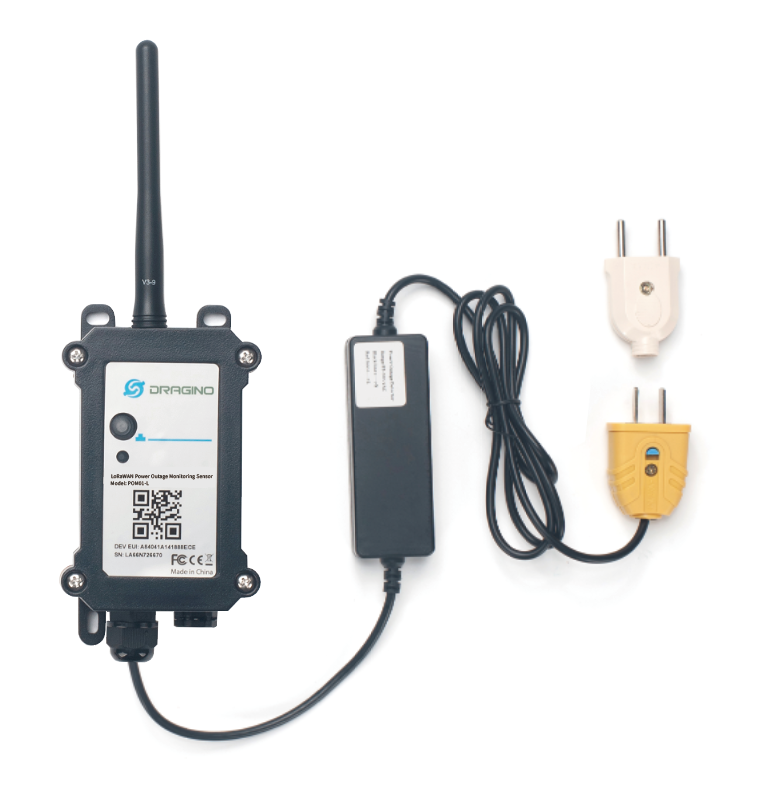
The Dragino POM01-L is a LoRaWAN-based Power Outage Monitoring Sensor designed for Internet of Things (IoT) applications. It monitors the status of AC mains power and reports power outage events, low-voltage conditions, and periodic status data to a cloud platform, making it suitable for remote monitoring scenarios with wide coverage and low power consumption.
The POM01-L uses LoRa wireless technology to enable ultra-long-range communication at low data rates. This technology provides high interference immunity while minimizing current consumption, allowing reliable operation in distributed and hard-to-reach locations.
The device adopts optocoupler isolation technology to safely detect the status of a 220 VAC / 110VAC power supply. It supports both power outage triggering (<17v) and low-voltage triggering (180v), enabling immediate alarm reporting when power is lost or when the voltage drops abnormally below a predefined threshold.
POM01-L is normally powered by 85 ~ 305 VAC directly and can automatically switch to an internal Li-ion backup battery during a power outage, ensuring continuous monitoring. It also supports data logging, storing data locally when the LoRaWAN network is unavailable and uploading it once the connection is restored.
The POM01-L supports BLE configuration and wireless OTA firmware updates for easy deployment and maintenance. Each device is pre-loaded with unique LoRaWAN keys, allowing it to automatically join a LoRaWAN network after registration and power-up.
1.2 Features
- LoRaWAN 1.0.3 Class A
- Ultra-low power consumption
- Power Outage Monitoring (<17v)
- Low Voltage Monitoring (< 180v)
- Bands: CN470/EU433/KR920/US915/EU868/AS923/AU915/IN865
- Support Bluetooth v5.1 and LoRaWAN remote configure
- Support wireless OTA update firmware
- Uplink on periodically
- Downlink to change configure
- Back up rechargeable 1000mAh battery
1.3 Specification
Common Characteristics:
- Supply Voltage: 85 ~ 305VAC
- Operating Temperature: -40 ~ 85°C
LoRa Spec:
- Frequency Range, Band 1 (HF): 862 ~ 1020 Mhz
- Max +22 dBm constant RF output vs.
- RX sensitivity: down to -137 dBm.
Battery:
- 1000mAh Li-ion battery
- Self-Discharge: <2% / Year @ 25°C
- Max continuously current: 130mA
- Max boost current: 2A @ 4V, 1 second
Power Consumption
- Sleep Mode: 50uA @ 3.3v
- LoRa Transmit Mode: 125mA @ 20dBm, 82mA @ 14dBm
1.4 Sleep mode and working mode
**Deep Sleep Mode: **Sensor doesn't have any LoRaWAN activate. This mode is used for storage and shipping to save battery life.
Working Mode: In this mode, Sensor will work as LoRaWAN Sensor to Join LoRaWAN network and send out sensor data to server. Between each sampling/tx/rx periodically, sensor will be in IDLE mode), in IDLE mode, sensor has the same power consumption as Deep Sleep mode.
1.5 Button & LEDs
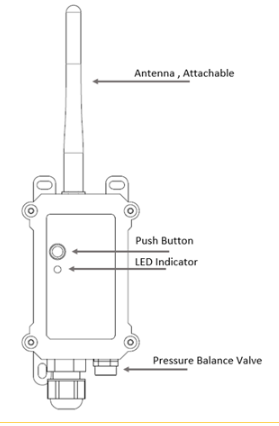
| Behavior on ACT | Function | Action |
|---|---|---|
 1~3s 1~3s | Send an uplink | If sensor is already Joined to LoRaWAN network, sensor will send an uplink packet, blue led will blink once. Meanwhile, BLE module will be active and user can connect via BLE to configure device. |
| >3s | Active Device | Green led will fast blink 5 times, device will enter OTA mode for 3 seconds. And then start to JOIN LoRaWAN network. Green led will solidly turn on for 5 seconds after joined in network. Once sensor is active, BLE module will be active and user can connect via BLE to configure device, no matter if device join or not join LoRaWAN network. |
 x5 x5 | Deactivate Device | Red led will solid on for 5 seconds. Means device is in Deep Sleep Mode. |
1.6 BLE connection
POM01-L support BLE remote configure.
BLE can be used to configure the parameter of sensor or see the console output from sensor. BLE will be only activate on below case:
- Press button to send an uplink
- Press button to active device.
- Device Power on or reset.
If there is no activity connection on BLE in 60 seconds, sensor will shut down BLE module to enter low power mode.
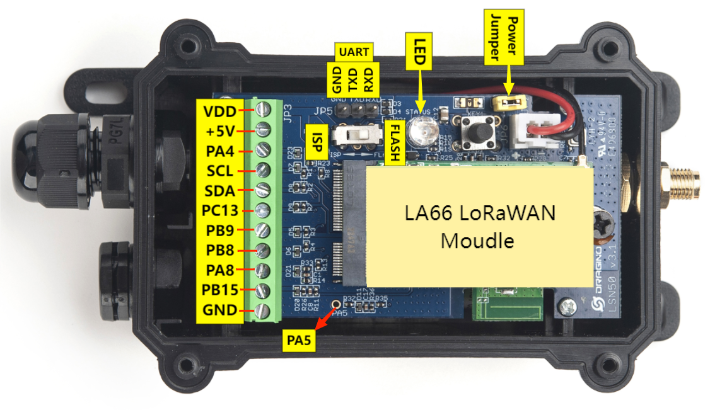
1.7 Pin Definitions
1.8 Wiring of DS18B20 temperature sensor
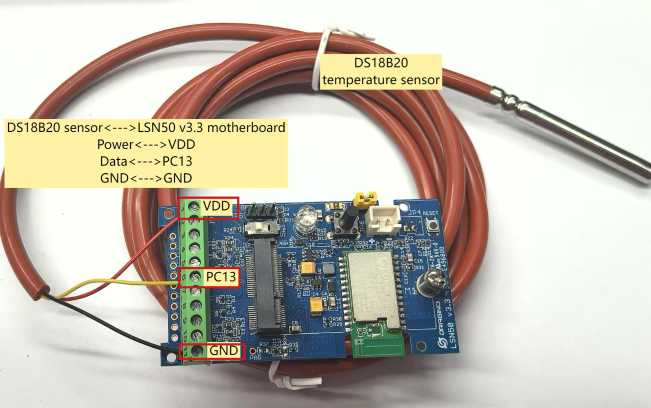
The POM01-L supports connection to the external temperature sensor DS18B20. The wiring method is as follows:
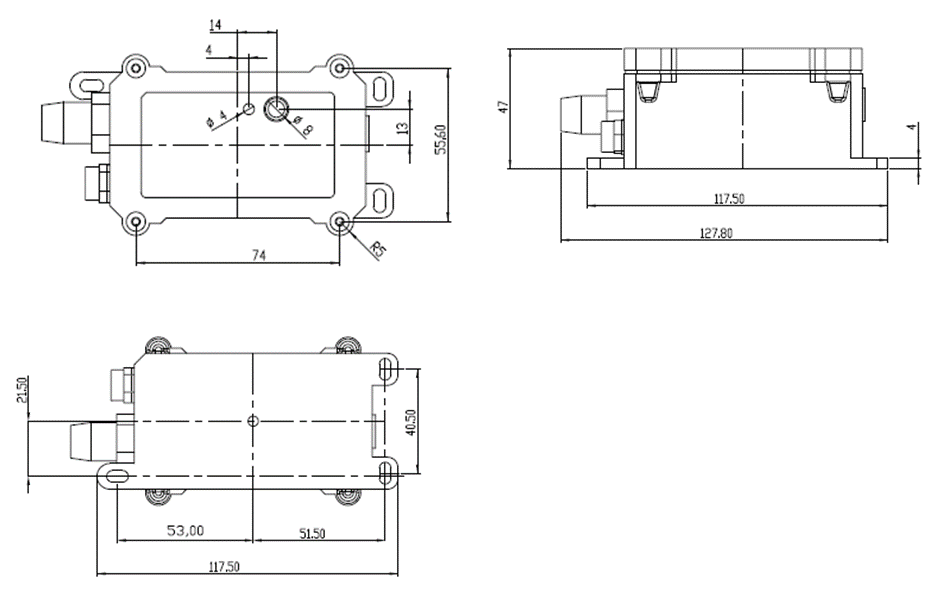
1.9 Mechanical
1.9.1 for LB version
2. Configure POM01-L to connect to LoRaWAN network
2.1 How it works
The POM01-L is configured as LoRaWAN OTAA Class A mode by default. It has OTAA keys to join LoRaWAN network. To connect a local LoRaWAN network, you need to input the OTAA keys in the LoRaWAN IoT server and press the button to activate the POM01-L. It will automatically join the network via OTAA and start to send the sensor value. The default uplink interval is 20 minutes.
2.2 Quick guide to connect to LoRaWAN server (OTAA)
Following is an example for how to join the TTN v3 LoRaWAN Network. Below is the network structure; we use the LPS8v2 as a LoRaWAN gateway in this example.
The LPS8V2 is already set to connected to TTN network , so what we need to now is configure the TTN server.
To be updated
Step 1: Create a device in TTN with the OTAA keys from POM01-L.
Each POM01-L is shipped with a sticker with the default device EUI as below:
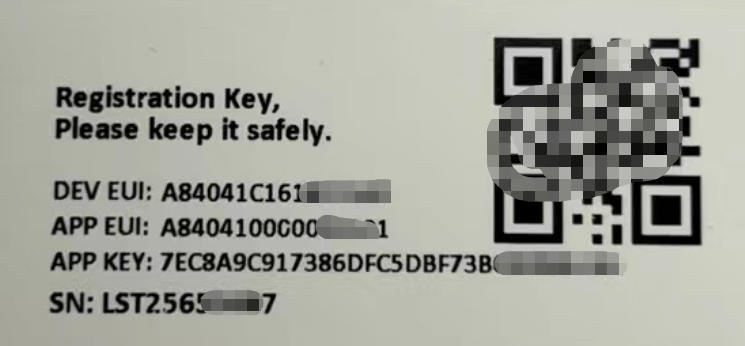
You can enter this key in the LoRaWAN Server portal. Below is TTN screen shot:
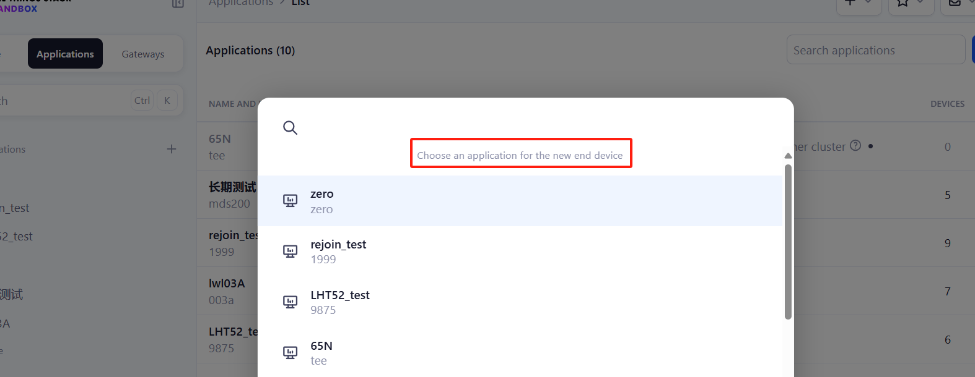
Create the application.

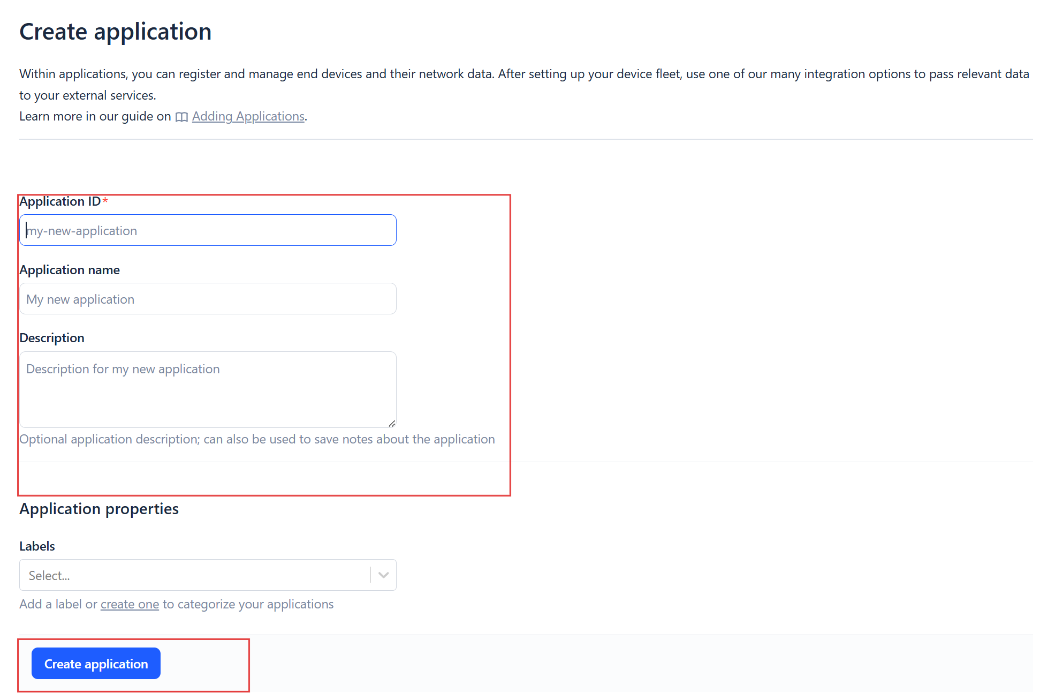
Add devices to the created Application.
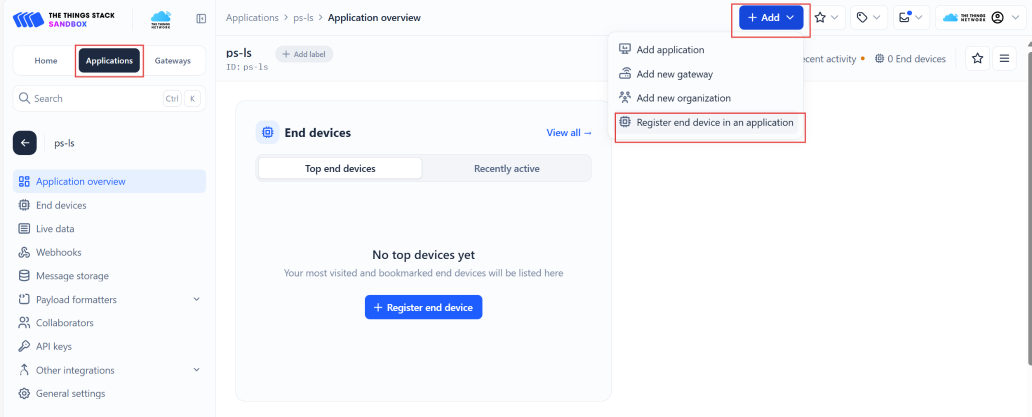
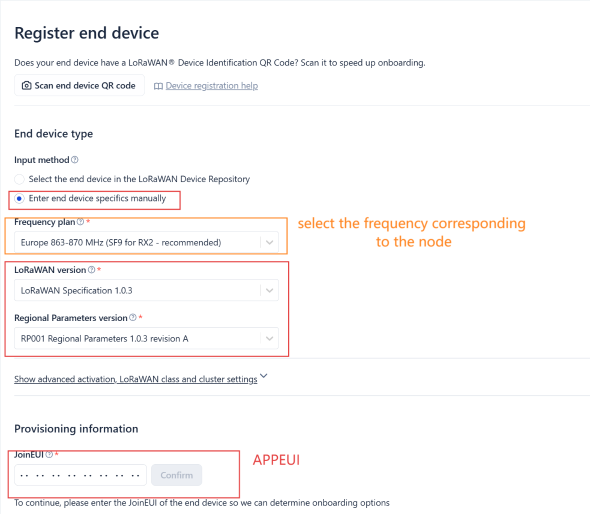
Enter end device specifics manually.
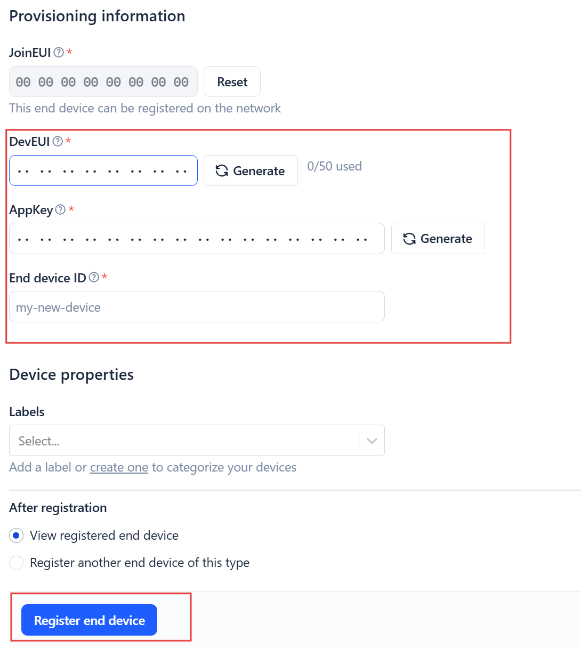
Add DevEUI and AppKey. Customize a platform ID for the device.
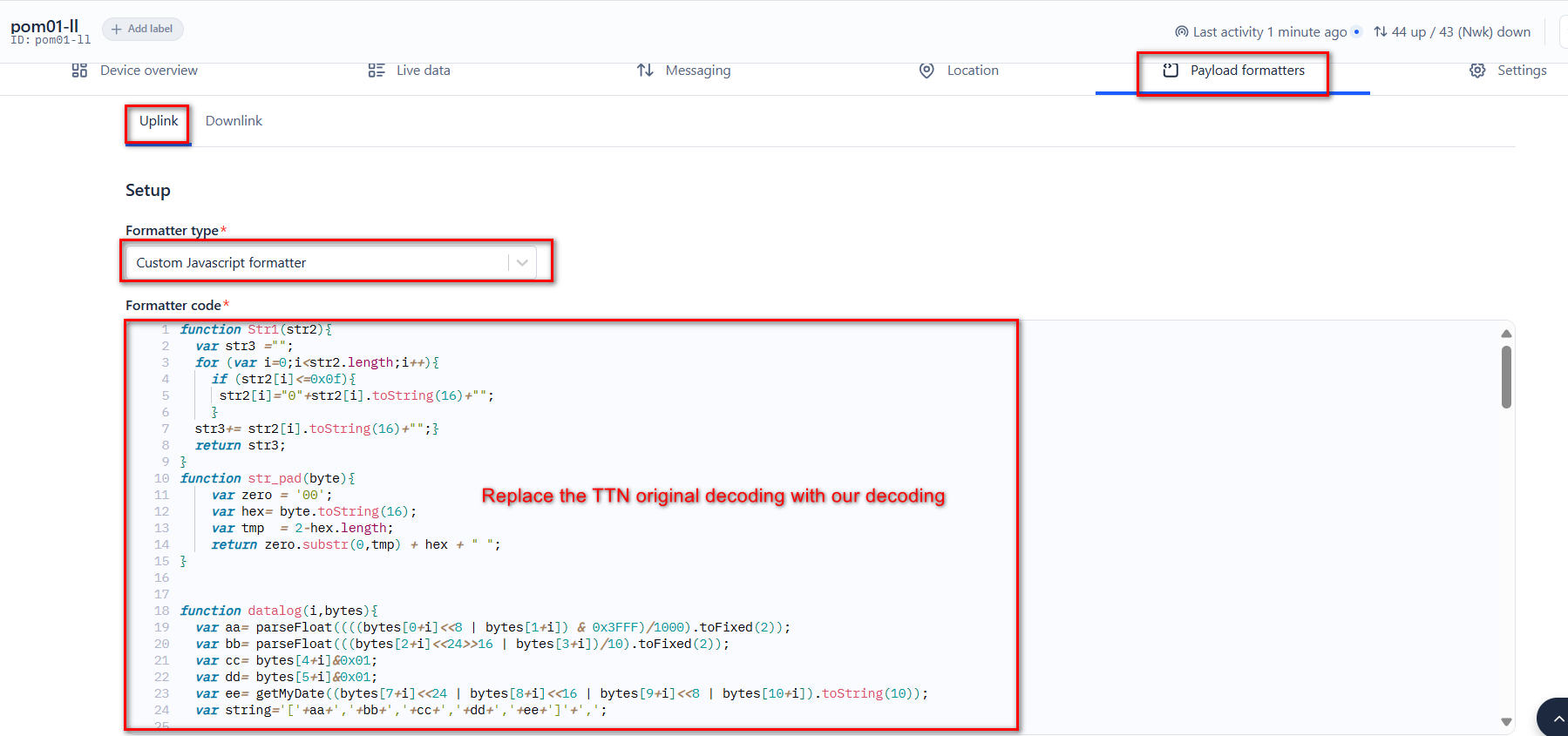
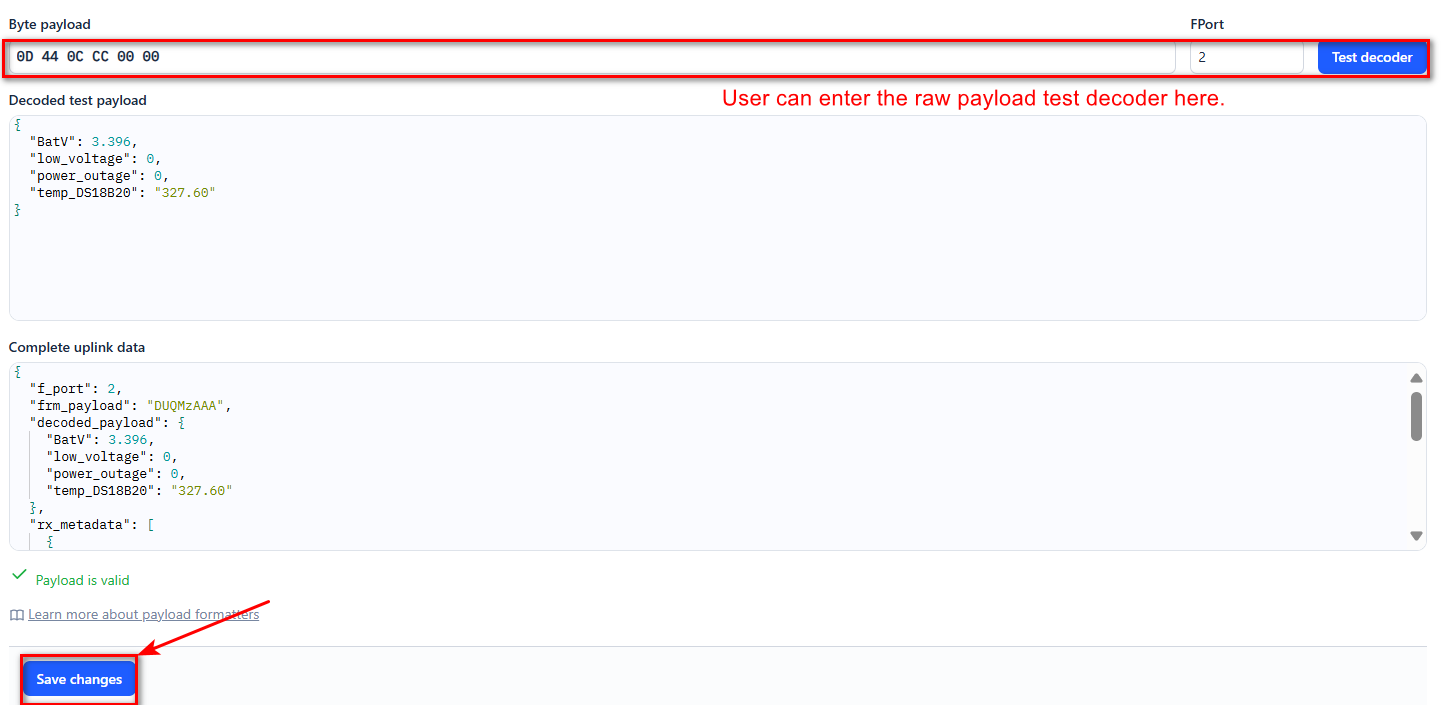
Step 2: Add decoder.
In TTN, user can add a custom payload so it shows friendly reading.
Click this link to get the decoder: https://github.com/dragino/dragino-end-node-decoder/tree/main/
Below is TTN screen shot:
Step 3: Activate on POM01-L
Press the button for 5 seconds to activate the POM01-L.
Green led will fast blink 5 times, device will enter OTA mode for 3 seconds. And then start to JOIN LoRaWAN network. Green led will solidly turn on for 5 seconds after joined in network.
After join success, it will start to upload messages to TTN and you can see the messages in the panel.
2.3 Uplink Payload
2.3.1 Device Status, FPORT=5
Users can use the downlink command(0x26 01) to ask POM01-L to send device configure detail, include device configure status. POM01-L will uplink a payload via FPort=5 to server.
The Payload format is as below.
| Device Status (FPORT=5) | |||||
| Size (bytes) | 1 | 2 | 1 | 1 | 2 |
| Value | Sensor Model | Firmware Version | Frequency Band | Sub-band | BAT |
Example parse in TTNv3

Sensor Model: For POM01-L, this value is 0x4F
Firmware Version: 0x0100, Means: v1.0.0 version
Frequency Band:
0x01: EU868
0x02: US915
0x03: IN865
0x04: AU915
0x05: KZ865
0x06: RU864
0x07: AS923
0x08: AS923-1
0x09: AS923-2
0x0a: AS923-3
0x0b: CN470
0x0c: EU433
0x0d: KR920
0x0e: MA869
Sub-Band:
AU915 and US915:value 0x00 ~ 0x08
CN470: value 0x0B ~ 0x0C
Other Bands: Always 0x00
Battery Info:
Check the battery voltage.
Ex1: 0x0CF0 = 3312mV
Ex2: 0x0B49 = 2889mV
2.3.2 Sensor Data. FPORT=2
Sensor Data is uplink via FPORT=2
| Size(bytes) | 2 | 4 | 1 | 1 |
|---|---|---|---|---|
| Value | Battery | temp_ DS18B20 | power_outage | low_voltage |

Battery
Sensor Battery Level.
Ex1: 0x0D44 = 3396mV / 1000 = 3.396V
Ex2: 0x0B49 = 2889mV / 1000 = 2.889V
temp_DS18B20
Example:
If payload is: 0105H: (0105 & 8000 == 0), temp = 0105H /10 = 26.1 degree
If payload is: FF3FH : (FF3F & 8000 == 1) , temp = (FF3FH - 65536)/10 = -19.3 degrees.
(FF3F & 8000: Judge whether the highest bit is 1, when the highest bit is 1, it is negative)
power_outage
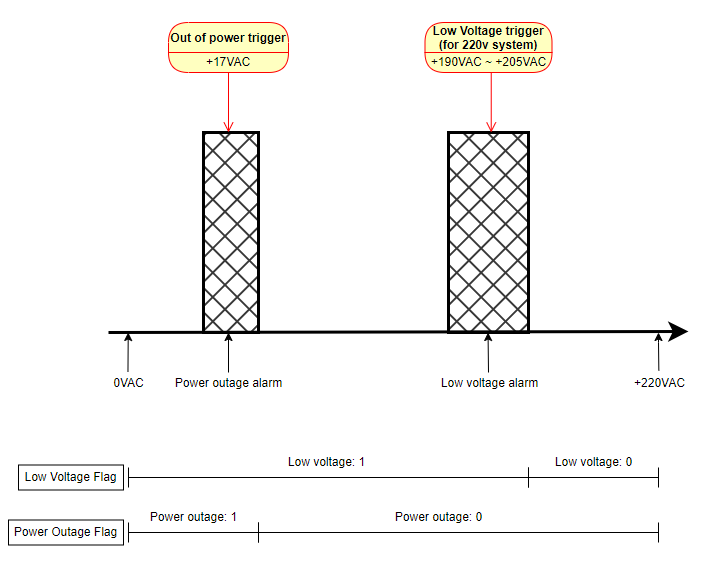
When the voltage drops from above 17V to below 17V, the state changes and a data packet is uploaded once. When the voltage rises from below 17V to above 17V, the state changes and a data packet is uploaded once.
Ex1: 0x00 Indicates voltage is greater than 17 volts (low level)
**Ex2: **0x01 Indicates voltage is below 17 volts (high level)
low_voltage
When the voltage drops from above 205V to below 190V, the status changes and a data packet is uploaded once. When the voltage rises from below 190V to above 205V, the status changes and a data packet is uploaded once.
Ex1: 0x00 Indicates voltage is greater than 180 volts (low level)
**Ex2: **0x01 Indicates voltage is below 180 volts (high level)
2.4 Payload Decoder file
In TTN, use can add a custom payload so it shows friendly reading
In the page Applications --> Payload Formats --> Custom --> decoder to add the decoder from:
https://github.com/dragino/dragino-end-node-decoder/tree/main/POM01-L
2.5 Datalog Feature
Datalog Feature is to ensure IoT Server can get all sampling data from Sensor even if the LoRaWAN network is down. For each sampling, POM01-L will store the reading for future retrieving purposes.
2.5.1 How datalog works
POM01-L will wait for ACK for every uplink, when there is no LoRaWAN network,POM01-L will mark these records with non-ack messages and store the sensor data, and it will send all messages (10s interval) after the network recovery.
a) POM01-L will do an ACK check for data records sending to make sure every data arrive server.
b) POM01-L will send data in CONFIRMED Mode, but POM01-L won't re-transmit the packet if it doesn't get ACK, it will just mark it as a NONE-ACK message. In a future uplink if POM01-L gets a ACK, POM01-L will consider there is a network connection and resend all NONE-ACK messages.
2.5.2 Enable Datalog
User need to make sure below two settings are enable to use datalog;
- SYNCMOD=1(Default) to enable sync time via LoRaWAN MAC command, click here (AT+SYNCMOD) for detailed instructions.
- **PNACKMD=1 **to enable datalog feature, click here (AT+PNACKMD) for detailed instructions.
Once POM01-L Joined LoRaWAN network, it will send the MAC command (DeviceTimeReq) and the server will reply with (DeviceTimeAns) to send the current time to POM01-L. If POM01-L fails to get the time from the server, POM01-L will use the internal time and wait for next time request (AT+SYNCTDC to set the time request period, default is 10 days).
Note: LoRaWAN Server need to support LoRaWAN v1.0.3(MAC v1.0.3) or higher to support this MAC command feature, Chirpstack,TTN V3 v3 and loriot support but TTN V3 v2 doesn't support. If server doesn't support this command, it will through away uplink packet with this command, so user will lose the packet with time request for TTN V3 v2 if SYNCMOD=1.
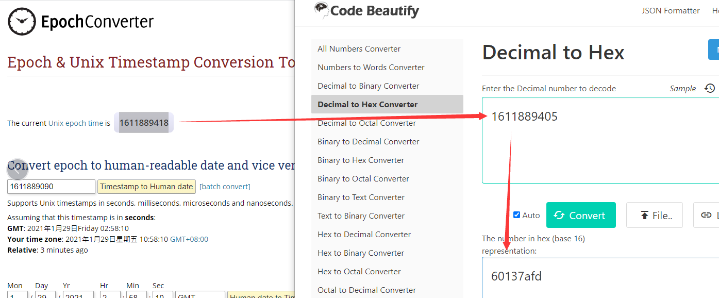
2.5.3 Unix TimeStamp
POM01-L uses Unix TimeStamp format based on

User can get this time from link: https://www.epochconverter.com/ :
Below is the converter example
2.5.5 Poll sensor value
User can poll sensor value based on timestamps from the server. Below is the downlink command.
| 1byte | 4bytes | 4bytes | 1byte |
| 31 | Timestamp start | Timestamp end | Uplink Interval |
Timestamp start and Timestamp end use Unix TimeStamp format as mentioned above. Devices will reply with all data log during this time period, use the uplink interval.
For example, downlink command 31 69 04 03 08 69 04 05 24 05
Is to check 2025/10/31 00:30:00 to 2025/10/31 00:39:00's data
Uplink Internal =5s, means POM01-L will send one packet every 5s. range 5~255s.
2.5.6 Datalog Uplink payload (FPORT=3)
The Datalog uplinks will use below payload format.
Retrieval data payload:
| Size(bytes) | 2 | 2 | 1 | 1 | 4 |
|---|---|---|---|---|---|
| Value | Battery | temp _DS18B20 | power _outage | low _voltage | Unix Time Stamp |
Poll message flag & Ext:
| Bits | 7 | 6 | 5 | 4 | [3:0] |
| Status&Ext | No ACK Message | Poll Message Flag | Sync time OK | Unix Time Request | Ext: 0b(1001) |
No ACK Message: 1: This message means this payload is fromn Uplink Message which doesn't get ACK from the server before ( for PNACKMD=1 feature)
Poll Message Flag: 1: This message is a poll message reply.
-
Poll Message Flag is set to 1.
-
Each data entry is 11 bytes, to save airtime and battery, devices will send max bytes according to the current DR and Frequency bands.
For example, in US915 band, the max payload for different DR is:
a) DR0: max is 11 bytes so one entry of data
b) DR1: max is 53 bytes so devices will upload 4 entries of data (total 44 bytes)
c) DR2: total payload includes 11 entries of data
**d) DR3: **total payload includes 22 entries of data.
If devise doesn't have any data in the polling time. Device will uplink 11 bytes of 0
Example:
If POM01-L has below data inside Flash:
Stop Tx events when read sensor data
0001 2025/10/31 00:30:37 3396 ds_temp=327.6 power_outage=1 low_voltage=1
0002 2025/10/31 00:31:37 3396 ds_temp=327.6 power_outage=1 low_voltage=1
0003 2025/10/31 00:32:37 3396 ds_temp=327.6 power_outage=1 low_voltage=1
0004 2025/10/31 00:33:37 3396 ds_temp=327.6 power_outage=1 low_voltage=1
0005 2025/10/31 00:34:37 3396 ds_temp=327.6 power_outage=1 low_voltage=1
0006 2025/10/31 00:35:37 3396 ds_temp=327.6 power_outage=1 low_voltage=1
0007 2025/10/31 00:36:37 3396 ds_temp=327.6 power_outage=1 low_voltage=1
0008 2025/10/31 00:37:37 3396 ds_temp=327.6 power_outage=1 low_voltage=1
0009 2025/10/31 00:38:37 3396 ds_temp=327.6 power_outage=1 low_voltage=1
0010 2025/10/31 00:39:37 3396 ds_temp=327.6 power_outage=1 low_voltage=1
Start Tx events
OK
If user sends below downlink command: 31690403086904052405
Where : Start time: 69040308 = time 25/10/31 00:30:00
Stop time: 69040524 = time 25/10/31 00:39:00
POM01-L will uplink this payload.

0D440CCC01014069040369 0D440CCC010140690403A5 0D440CCC010140690403E1 0D440CCC0101406904041D 0D440CCC010140690404590 D440CCC01014069040495 0D440CCC010140690404D1 0D440CCC0101406904050D
Where the first 11 bytes is for the first entry:
0D 44 0C CC 01 01 40 69 04 03 2D
Battery Level = 0x0D44 = 3396mV / 1000 = 3.396V
Temp_DS18B20 = 0x0CCC = 3276℃ / 10 = 327.6℃
**power_outage = **0x01 Indicates voltage is below 17 volts (high level)
**low_voltage = **0x01 Indicates voltage is below 180 volts (high level)
poll message flag & Alarm Flag & Level of PA8=0x40,means reply data,sampling uplink message,the PA8 is low level.
Unix time is 0x6904032D=1761870637s=25/10/31 00:30:00
的的
2.6 Voltage detection Range
POM01-L work flow with Alarm feature.
2.6.1 Voltage detection example
1. When the AC voltage rises from 0 to 220V: power outage = 1 --> 0, low voltage = 1 --> 0, a voltage status change data packet will be sent, as shown in the figure below:

2. When the AC voltage rises from 0V to 110V: Power outage = 1 --> 0, low voltage = 1 --> 1, a voltage state change data packet will be sent, as shown in the figure below:

3. When the AC voltage rises from 0V to above 17V but below 190V: Power outage = 1 --> 0, low voltage = 1 --> 1, a voltage status change data packet will be sent, as shown in the figure below:

4. When the AC voltage drops from above 17V to below 15V: Power outage = 0 --> 1, low voltage = 1 --> 1, a voltage status change data packet will be sent, as shown in the figure below:

2.7 Frequency Plans
The POM01-L uses OTAA mode and below frequency plans by default. Each frequency band use different firmware, user update the firmware to the corresponding band for their country.
/docs/wiki/Configuration/end-node/frequency-band/
2.8 Firmware Change Log
**Firmware download link: **https://www.dropbox.com/sh/fis3g6nmhv0eokg/AAC6BcCZaX4BdqZkduUvZ3jIa?dl=0
3. Configure POM01-L
3.1 Configure Methods
POM01-L supports below configure method:
- AT Command via Bluetooth Connection (Recommended): BLE Configure Instruction.
- AT Command via UART Connection : See UART Connection.
- LoRaWAN Downlink. Instruction for different platforms: See IoT LoRaWAN Server section.
3.2 General Commands
These commands are to configure:
- General system settings like: uplink interval.
- LoRaWAN protocol & radio related command.
They are same for all Dragino Devices which support DLWS-005 LoRaWAN Stack. These commands can be found on the wiki:
/docs/wiki/Configuration/end-node/at-commands-downlink/
3.3 Commands special design for POM01-L
These commands only valid for POM01-L, as below:
3.3.1 Set Transmit Interval Time
Feature: Change LoRaWAN End Node Transmit Interval.
AT Command: AT+TDC
| Command Example | Function | Response |
|---|---|---|
| AT+TDC=? | Show current transmit Interval | 30000 OK the interval is 30000ms = 30s |
| AT+TDC=60000 | Set Transmit Interval | OK Set transmit interval to 60000ms = 60 seconds |
Downlink Command: 0x01
Format: Command Code (0x01) followed by 3 bytes time value.
If the downlink payload=0100003C, it means set the END Node's Transmit Interval to 0x00003C=60(S), while type code is 01.
- Example 1: Downlink Payload: 0100001E // Set Transmit Interval (TDC) = 30 seconds
- Example 2: Downlink Payload: 0100003C // Set Transmit Interval (TDC) = 60 seconds
3.3.2 Get Device Status
Send a LoRaWAN downlink to ask device send Alarm settings.
**Downlink Payload: **0x26 01
Sensor will upload Device Status via FPORT=5. See payload section for detail.
3.3.3 Set Interrupt Mode
Feature, Set Interrupt mode for PA8 and PB15 of pin.
When AT+INTMOD=0,0 is set, PA8 and PB15 is used as a digital input port.
AT Command: AT+INTMOD
| Command Example | Function | Response |
|---|---|---|
| AT+INTMOD=? | Show current interrupt mode | 0,0 OK the mode is 0 =Disable Interrupt |
| AT+INTMOD=1,1 | 0: Disable Interrupt 1: Trigger by rising and falling edge 2: Trigger by falling edge 3: Trigger by rising edge | OK |
Downlink Command: 0x06
Format: Command Code (0x06) followed by 2 bytes.
This means that the interrupt mode of the end node is set to 0x0303=3,3 (rising edge trigger), and the type code is 06.
- Example 1: Downlink Payload: 060000 // Turn off PA8 and PB15 interrupt mode
- Example 2: Downlink Payload: 060303 // Set the interrupt mode for PA8 and PB15 to rising edge trigger.
3.3.4 Print data entries base on page
Feature: Print the sector data from start page to stop page (max is 416 pages).
AT Command: AT+PDTA
| Command Example | Function |
|---|---|
| AT+PDTA=1,1 Print page 1 to 1 | Stop Tx events when read sensor data 8031000 1970/7/20 06:11:15 0 ds_temp=0.4 power_outage=1 low_voltage=1 8031010 1970/7/20 07:06:43 0 ds_temp=0.1 power_outage=1 low_voltage=1 8031020 1970/1/1 00:00:00 0 ds_temp=0.0 power_outage=0 low_voltage=0 8031030 1970/1/1 00:00:00 0 ds_temp=0.0 power_outage=0 low_voltage=0 8031040 1970/1/1 00:00:00 0 ds_temp=0.0 power_outage=0 low_voltage=0 8031050 1970/1/1 00:00:00 0 ds_temp=0.0 power_outage=0 low_voltage=0 8031060 1970/1/1 00:00:00 0 ds_temp=0.0 power_outage=0 low_voltage=0 8031070 1970/1/1 00:00:00 0 ds_temp=0.0 power_outage=0 low_voltage=0 Start Tx events OK |
Downlink Command:
No downlink commands for feature
3.3.5 Print last few data entries
Feature: Print the last few data entries
AT Command: AT+PLDTA
| Command Example | Function |
|---|---|
| AT+PLDTA=10 Print last 10 entries | Stop Tx events when read sensor data 0001 2025/10/30 08:38:37 3396 ds_temp=327.6 power_outage=0 low_voltage=1 0002 2025/10/30 08:39:37 3396 ds_temp=327.6 power_outage=0 low_voltage=1 0003 2025/10/30 08:40:37 3396 ds_temp=327.6 power_outage=0 low_voltage=1 0004 2025/10/30 08:41:37 3396 ds_temp=327.6 power_outage=0 low_voltage=1 0005 2025/10/30 08:42:37 3396 ds_temp=327.6 power_outage=0 low_voltage=1 0006 2025/10/30 08:43:37 3396 ds_temp=327.6 power_outage=0 low_voltage=1 0007 2025/10/30 08:44:53 3396 ds_temp=327.6 power_outage=0 low_voltage=1 0008 2025/10/30 08:45:53 3396 ds_temp=327.6 power_outage=0 low_voltage=1 0009 2025/10/30 08:47:34 3396 ds_temp=327.6 power_outage=0 low_voltage=1 0010 2025/10/30 08:48:34 3396 ds_temp=327.6 power_outage=0 low_voltage=1 Start Tx events OK |
Downlink Command:
No downlink commands for feature
3.3.6 Clear Flash Record
Feature: Clear flash storage for data log feature.
AT Command: AT+CLRDTA
| Command Example | Function | Response |
|---|---|---|
| AT+CLRDTA | Clear date record | Clear all stored sensor data… OK |
Downlink Command: 0xA3
- Example: 0xA301 // Same as AT+CLRDTA
4. Battery & Power Consumption
POM01-L use 1000mAh Recharable Battery with Solar Panel. See below link for detail information about the battery info and how to replace.
Battery Info & Power Consumption Analyze .
5. OTA Firmware update
User can change firmware POM01-L to:
- Change Frequency band/ region.
- Update with new features.
- Fix bugs.
Firmware and changelog can be downloaded from : Firmware download link
Methods to Update Firmware:
- (Recommended way) OTA firmware update via wireless: Firmware OTA Update for LoRaWAN End Node
- Update through UART TTL interface : Instruction.
6. FAQ
6.1 Why is there no LED response when I press the button on the solar panel model?
If the LED does not light up when you press the button, it may be because the battery has entered protection mode.
Solution: To reactivate the battery, simply expose the solar panel to direct sunlight. For more details, please refer to: Battery Protection State (Apply to Solar Panel + Li-ion battery)
7. Order Info
Part Number: POM01-L-XX
XX: The default frequency band
-
AS923: LoRaWAN AS923 band
-
AU915: LoRaWAN AU915 band
-
EU433: LoRaWAN EU433 band
-
EU868: LoRaWAN EU868 band
-
KR920: LoRaWAN KR920 band
-
US915: LoRaWAN US915 band
-
IN865: LoRaWAN IN865 band
-
CN470: LoRaWAN CN470 band
8. Packing Info
Package Includes:
- POM01-L LoRaWAN Power Outage Monitoring Sensor
Dimension and weight:
-
Device Size: cm
-
Device Weight: g
-
Package Size / pcs : cm
-
Weight / pcs : g
9. Support
-
Support is provided Monday to Friday, from 09:00 to 18:00 GMT+8. Due to different timezones we cannot offer live support. However, your questions will be answered as soon as possible in the before-mentioned schedule.
-
Provide as much information as possible regarding your enquiry (product models, accurately describe your problem and steps to replicate it etc) and send a mail to Support@dragino.cc.
0