MQTT TLS Certificate Configuration for -FB/-FS/-FE
1. Overview
This document describes how to write TLS certificates to Dragino -FB / -FS / -FE series end nodes based on the Nordic nRF9151 module for secure MQTT connections.
Certificates are managed using AT%CMNG within the working firmware. A dedicated certificate-provisioning firmware is not required. MQTT server settings and platform configuration are covered separately in the device's general manual.
2. Prepare Certificate Files and Serial Port Access
Obtain the certificates required by your MQTT server in PEM format:
- CA certificate: Used to verify the MQTT server certificate.
- Client certificate: Used for client authentication when required by the server.
- Client private key: The private key matching the client certificate.
Use the certificates for your own MQTT server. Open the files in a text editor and preserve their complete PEM content, including the BEGIN/END lines and original line breaks. Connect a serial port tool to the device to send the commands below.
- Certificates can only be written when the device is idle (not transmitting). Writing during an active uplink may cause the operation to be interrupted or fail. So before writing certificates, wait for the device to enter sleep mode automatically after completing its normal data transmission. Alternatively, press the ACT button five times in quick succession to force the device into deep sleep mode immediately.
- The serial port must be unlocked before writing certificates. To unlock, send the password: directly enter the 6-character AT+PIN (e.g., 123456).
- You MUST send AT+CERTMOD=1 first to enter certificate writing mode. Without this command, the device will not respond to write commands.
- After completing certificate writing, send AT+CERTMOD=0 again to exit certificate writing mode. Otherwise, the device will remain in a high-power consumption state.
- If you need to replace certificates, delete the corresponding existing CA certificate, client certificate or private key first, as described in Section 8.
3. Enter and Exit Certificate Writing Mode
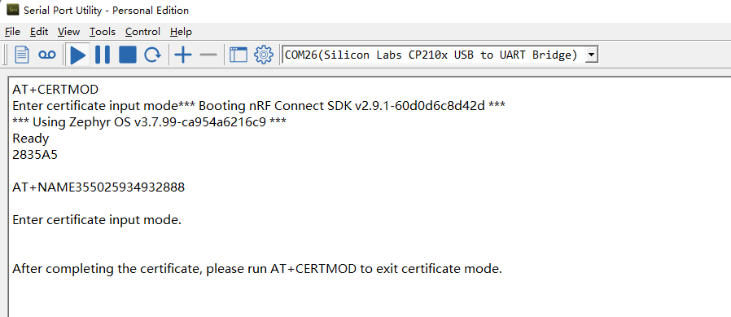
Send AT+CERTMOD=1 to enter certificate writing mode.
Enter Certificate Writing Mode:
Send AT+CERTMOD=0 after completing certificate operations to exit certificate writing mode.
Exit Certificate Writing Mode:
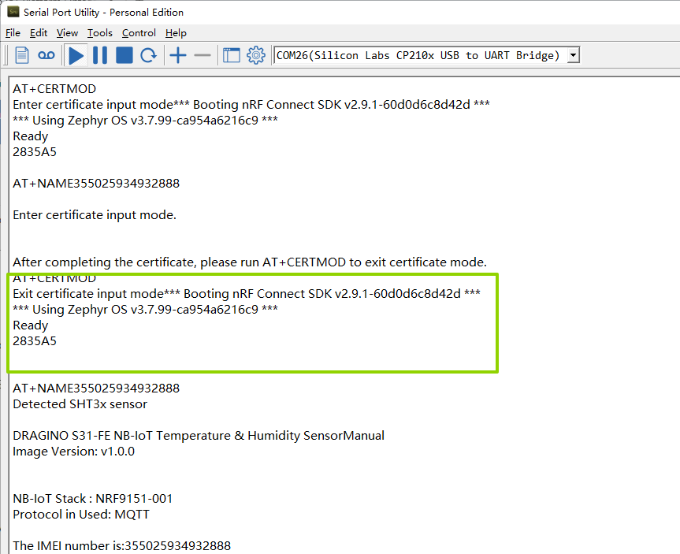
Note: After exiting certificate writing mode, the device will automatically restart.
4. AT%CMNG Command Explanation
Feature: Manage certificates on -FB/-FS/-FE series devices (Nordic nRF9151). Supports writing, listing, reading, and deleting certificates.
AT command: AT%CMNG=<opcode>,<sec_tag>,<type>[,<content>[,<passwd>]]
| Command Format/Example | Function/Parameters | Description |
|---|---|---|
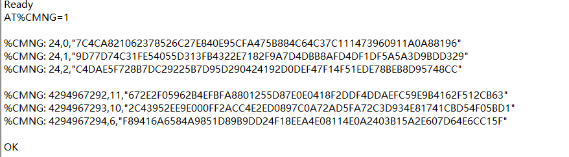
| AT%CMNG=1 | List all certificates | Displays all stored certificates with sec_tag and type |
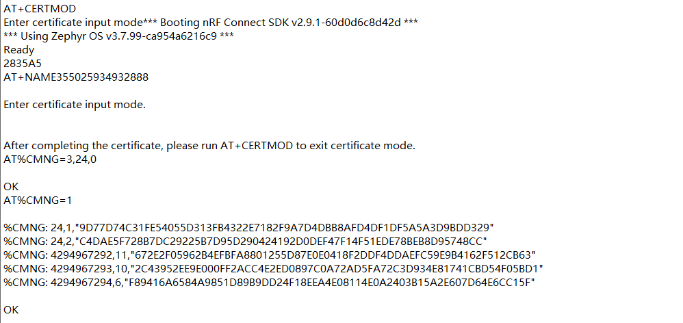
| AT%CMNG=3,<sec_tag>, | Delete a certificate | Deletes the specified certificate |
Parameter Description:
- opcode - Operation type:
- 0 - Write a certificate
- 1 - List all certificates
- 2 - Read a specific certificate
- 3 - Delete a certificate
- sec_tag - Security tag. The MQTT examples in this guide use 24 for the CA certificate, client certificate and private key.
- type - Certificate type:
- 0 - Root CA certificate
- 1 - Client certificate
- 2 - Client private key
- 3 - PSK (Pre-Shared Key)
- 4 - PSK identity
- 5 - Public key
- content - Actual certificate/key content in PEM format (including BEGIN/END lines)
**Example: **
- **AT%CMNG=1 ** //List all certificates
- AT%CMNG=3,24,0 //Delete CA certificate
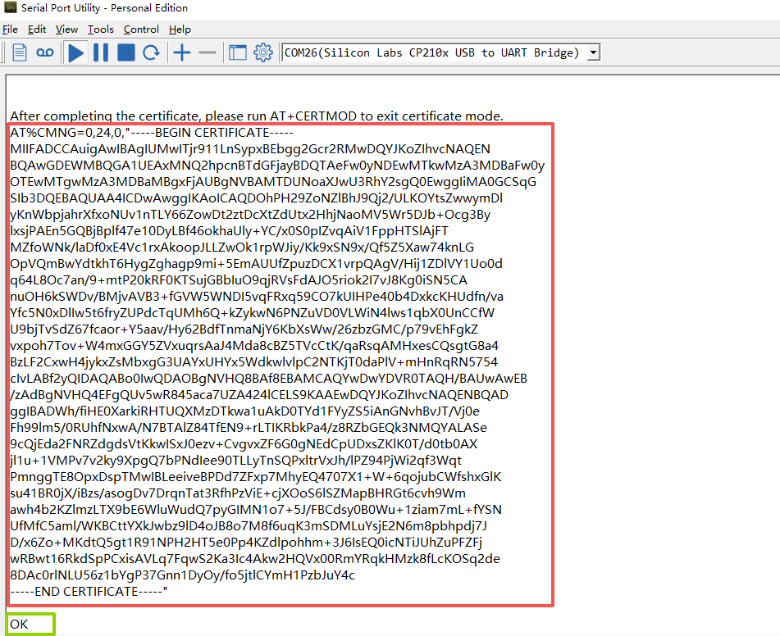
5. Write CA Certificate
Feature: Write root CA certificate to the device.
AT%CMNG=0,24,0,"<ca_certificate_content>"
Replace <ca_certificate_content> with the complete CA certificate in PEM format, including its BEGIN/END lines and original line breaks. Do not send the placeholder text.
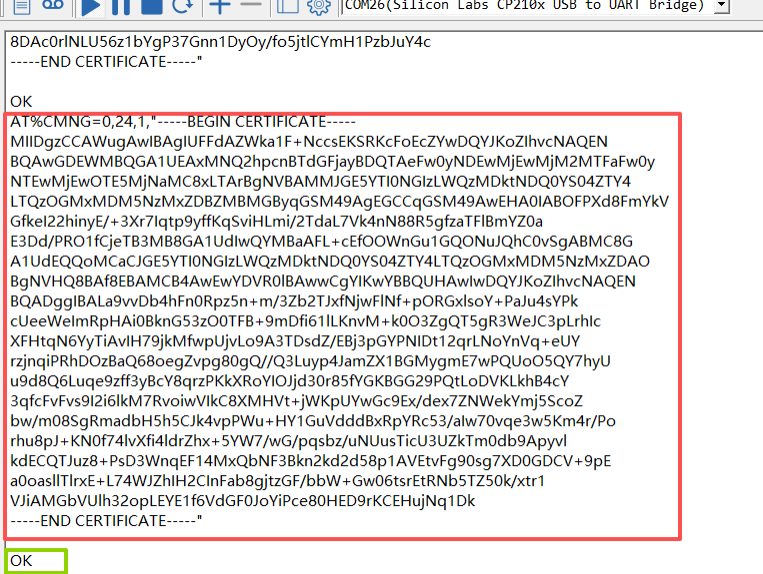
6. Write Client Certificate
Feature: Write client certificate to the device.
AT%CMNG=0,24,1,"<client_certificate_content>"
Replace <client_certificate_content> with the complete client certificate in PEM format, including its BEGIN/END lines and original line breaks. Do not send the placeholder text.
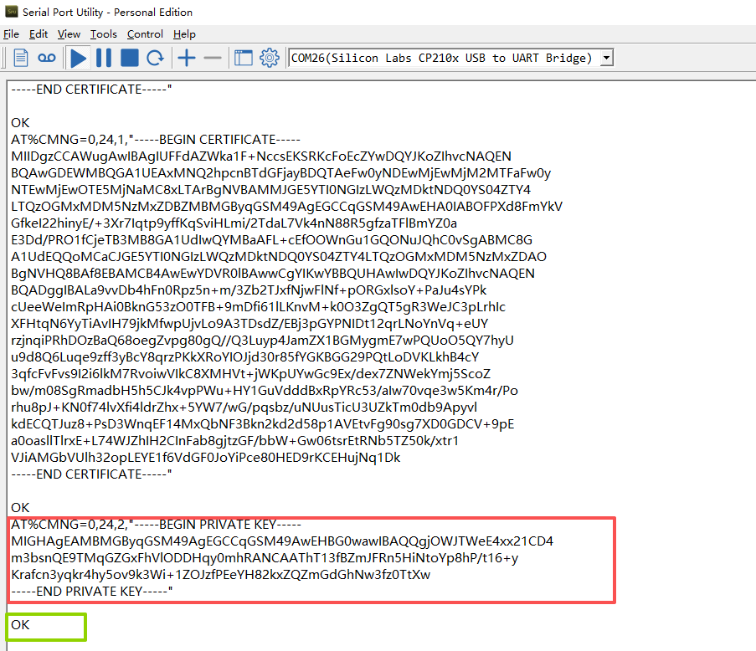
7. Write Client Private Key
Feature: Write client private key to the device.
AT%CMNG=0,24,2,"<private_key_content>"
Replace <private_key_content> with the complete client private key in PEM format, including its BEGIN/END lines and original line breaks. Do not send the placeholder text.
8. Delete or Replace Certificates
Feature: Delete existing certificates from the device.
AT command: AT%CMNG=3,<sec_tag>,
| Command Example | Function |
|---|---|
| AT%CMNG=3,24,0 | Delete CA certificate (type=0) |
| AT%CMNG=3,24,1 | Delete client certificate (type=1) |
| AT%CMNG=3,24,2 | Delete private key (type=2) |
After deleting an existing certificate, use the corresponding write command above to upload its replacement. Wait for each operation to finish and check the serial response for errors before continuing.
9. Complete Certificate Configuration
After writing the required certificates, send AT%CMNG=1 to list the stored entries and check that the required certificate types are present under security tag 24. Listing confirms the entries are stored; verify the actual TLS connection using your MQTT platform.
Send AT+CERTMOD=0 to exit certificate writing mode. The device will automatically restart. Leaving certificate writing mode enabled causes high power consumption.
Continue with the MQTT server address, topics and TLS authentication settings in your device's general manual. For ThingsEye, return to Section 3.9.3, Configure -FB/-FS/-FE Node: Write Certificates, and complete the MQTT connection settings there.