SPH01-MS Soil pH and Temperature Mesh Node
1. Introduction
1.1 What is the Dragino Mesh Soil pH Sensor?
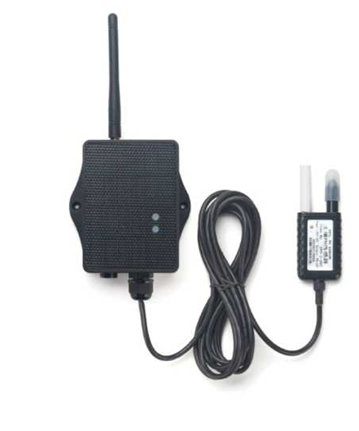
SPH01-MS is a Dragino Mesh Node for monitoring soil pH and soil temperature. It combines an IP68 buried soil probe with LoRa Mesh communication and can send measurements directly to a Mesh gateway or through other Mesh Nodes.
The probe uses a solid AgCl reference electrode and a pure-metal pH-sensitive electrode. Internal temperature compensation improves pH stability within the specified compensation range.
Soil pH measurements depend strongly on installation conditions, soil moisture, electrode condition, and stabilization time. Correct preparation, installation, and maintenance are necessary for representative results.
1.2 Features
- Soil pH and soil-temperature measurement.
0.01 pHresolution within the specified measurement range.- Internal temperature compensation for pH measurement.
- Solid AgCl reference electrode and pure-metal pH-sensitive electrode.
- IP68 probe for buried or immersed measurement.
- LoRa Mesh communication with multi-hop relaying.
- S-type outdoor enclosure, solar panel, and 3000 mAh rechargeable lithium battery.
- Scheduled measurement and low-power operation.
- Probe-level calibration at
pH 4.00,pH 6.86, andpH 9.18. - Firmware upgrades through USB serial or PC BLE.
1.3 Specifications
Common DC characteristics
| Item | Specification |
|---|---|
| Main unit operating voltage | Approximately 2.5 V to 3.6 V |
| Main unit operating temperature | -40 °C to 85 °C; battery operating temperature is subject to the battery specification |
Soil pH
| Item | Specification |
|---|---|
| Range | 3 to 10 pH |
| Resolution | 0.01 pH |
| Accuracy | ±2 % under the specified conditions |
| Temperature compensation | 0 °C to 50 °C; frozen soil can reduce accuracy |
Soil temperature
| Item | Specification |
|---|---|
| Range | -40 °C to 85 °C |
| Resolution | 0.1 °C |
| Accuracy | ±0.5 °C from 10 °C to 40 °C; ±0.8 °C outside this range |
Soil pH probe
| Item | Specification |
|---|---|
| Operating voltage | 5 V to 24 V |
| Current while powered | Measurement peak less than 50 mA; average less than 2 mA |
| Communication | RS-485 / Modbus RTU |
| Factory communication settings | Station address 254; 9600, no parity, 8 data bits, 1 stop bit |
| pH response time | 2 to 15 seconds, adaptive |
| pH stabilization time | Approximately 30 minutes to 24 hours, depending on probe condition and installation |
| Temperature stabilization time | Less than 5 minutes |
| Protection rating | IP68 |
| Operating temperature | -10 °C to 70 °C |
| Cable length | Standard 3.5 m |
Mesh main unit
| Item | Specification |
|---|---|
| MCU | STM32WLE5, 48 MHz ARM Cortex-M4 |
| Flash | 256 KB |
| RAM | 64 KB |
| Radio | STM32WLE5 integrated sub-GHz LoRa radio |
| Power supply | Solar panel + 3000 mAh rechargeable lithium battery |
| Local interfaces | 3.3 V UART, BLE |
| Antenna | Sub-GHz LoRa antenna matching the shipping Region |
1.4 Applications
- Soil acidity and alkalinity monitoring in fields, greenhouses, nurseries, orchards, and landscaping projects.
- Long-term root-zone pH and temperature monitoring.
- Observation of changes related to irrigation, fertilization, amendments, and seasonal variation.
- Comparison of soil pH between plots or treatment areas.
- Remote agricultural sites requiring solar power and multi-hop wireless coverage.
1.5 Sleep Mode and Working Mode
In the sleep state, the node disables most functions and remains in low-power standby until its next scheduled wake-up or a user action wakes it.
The intended working cycle is:
Reach scheduled time -> Wake up -> Power and read the pH probe
                     -> Validate and send the measurement
                     -> Wait for a short communication window -> Sleep
The probe may respond within seconds, but a valid communication response does not guarantee that soil pH has reached field equilibrium. Recently installed or maintained probes can require additional stabilization time.
1.6 Button Operations and LED Status
Button operations and LED indications are common to Dragino Mesh Nodes. See 3.1 Button Operations and LED Status in the Mesh Quick Start for everyday operations. For factory reset, manual sleep, and Bootloader entry, see How to Use Advanced Button Operations.
1.7 BLE and Local Interfaces
SPH01-MS provides 3.3 V UART and BLE local interfaces. BLE can be used for normal APP firmware updates from a PC through PC BLE in FirmwareUpdateUtility.
The mobile upgrade workflow is still under development.
1.8 Enclosure and Mechanical Reference
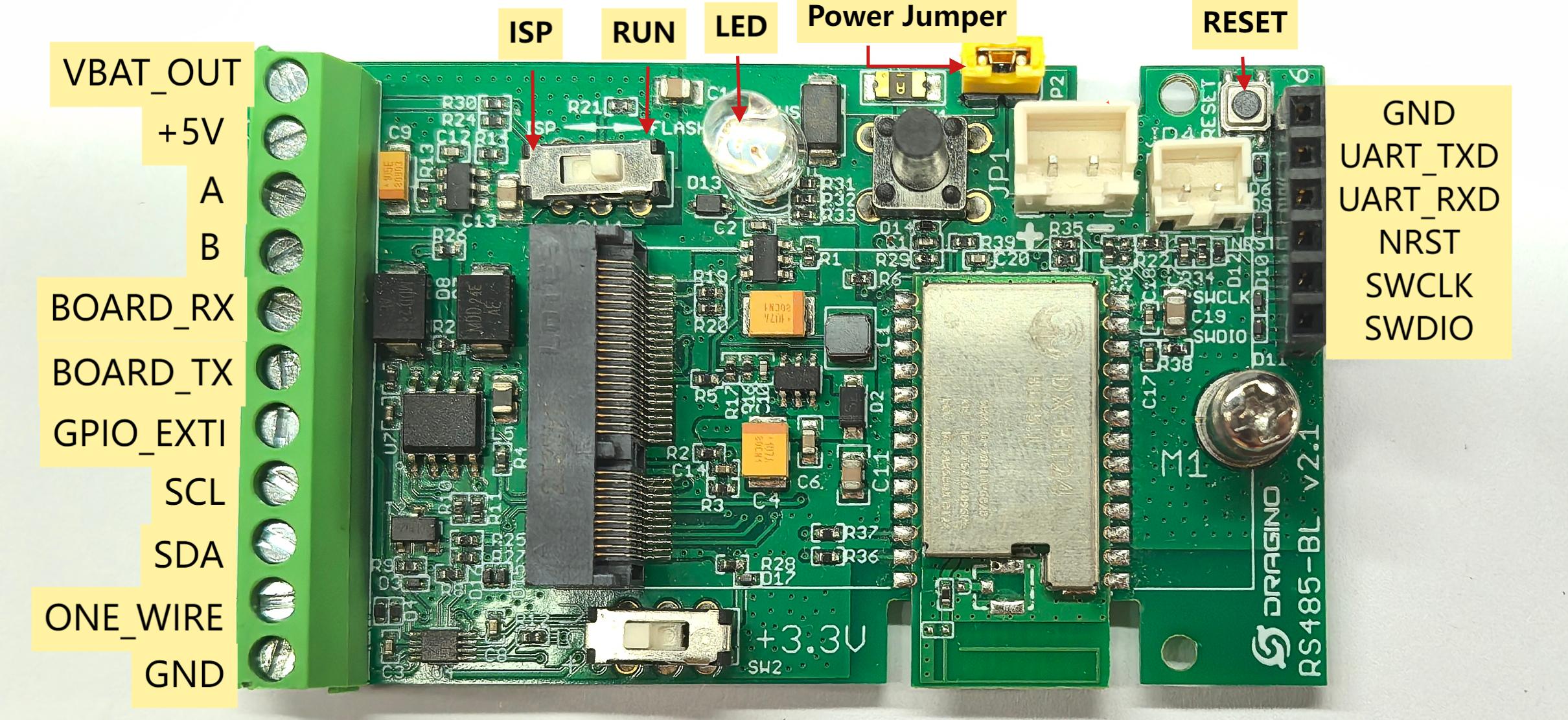
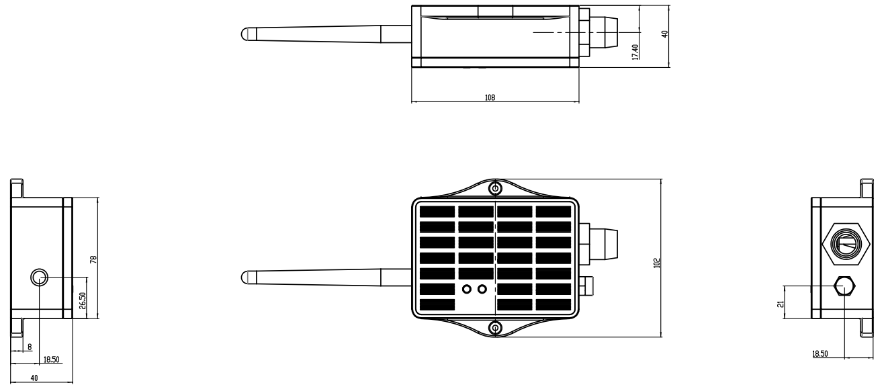
The following figures show the pin definitions and the solar enclosure dimensions, mounting points, and cable outlets used by SPH01-MS.
Pin definitions
Solar enclosure dimensions and mounting reference
1.9 Soil pH Measurement and Installation
1.9.1 Understanding Soil pH and Temperature
| pH condition | General meaning |
|---|---|
Below 7 | Acidic |
Around 7 | Neutral |
Above 7 | Alkaline |
Suitable pH targets depend on the crop, soil type, nutrient-management plan, and local agronomic practice.
The pH and temperature readings should be interpreted together. Frozen soil, poor electrode contact, low moisture, contamination, and insufficient stabilization can affect the result.
1.9.2 Before First Use or After Storage
A new or recently cleaned probe, or one unused for more than approximately seven days, should be activated before measurement.
Use one of these methods:
- Soak the sensing part in pure water for approximately
24 hours. - Pre-bury the probe in moist soil for at least
24 hours.
Keep the reference electrode moist when the probe is not in use.
1.9.3 Selecting the Measurement Point
Choose a representative location. Avoid stones, buried metal, large roots, fertilizer deposits, drainage channels, and irrigation outlets unless that condition is intentionally being monitored.
For comparisons, use the same preparation, depth, moisture condition, and installation method.
1.9.4 Temporary Measurement
Open the soil to the target depth
            -> Remove stones and hard objects
            -> Moisten the measurement point with pure water,
               purified water, or rainwater until the soil is muddy
            -> Insert the probe slowly without shaking or forcing it
            -> Pack soil around the probe body
            -> Wait for the reading to stabilize
The pH-sensitive and reference electrodes are mechanically fragile. Do not hammer, bend, twist, shake, or force the probe against hard objects.
1.9.5 Permanent Buried Measurement
Dig an access hole to the required depth
            -> Prepare a moist, stone-free measurement point
            -> Place the probe carefully at the bottom of the hole
            -> Fill and compact the surrounding soil
            -> Route the cable without tension or sharp bends
            -> Allow the probe to stabilize before defining baseline values
Install the enclosure above ground with the cable outlet facing downward and provide a drip loop.
1.9.6 Installation Check
After installation, confirm that the node obtains plausible pH and temperature readings. Fixed, extreme, or unstable values can indicate insufficient activation, poor contact, dry soil, air gaps, contamination, damaged electrodes, insufficient stabilization, or a connection problem.
1.10 Probe Maintenance
- Keep the reference electrode moist when the probe is not in use.
- Do not allow the sensing electrodes to contact oil or greasy substances.
- Do not pull the probe by its cable.
- Loosen the surrounding soil before removing a buried probe.
- Protect both electrodes from impact, bending, and sideways force.
- After approximately
3 to 6 monthsof long-term burial, inspect and clean the electrode if the reading becomes slow or unstable. - The metal electrode can be cleaned carefully with fine-grade sandpaper or soaked for several minutes in
5 %hydrochloric acid until the surface becomes bright again, then rinsed thoroughly with purified water. - After cleaning, reactivate the probe and allow it to stabilize before comparing new readings with historical data.
Hydrochloric acid is corrosive. Use suitable personal protective equipment, ventilation, compatible containers, and the site's chemical-handling and disposal procedures. Rinse the probe thoroughly with purified water after acid cleaning.
2. Mesh Operation
2.1 How It Works
Mesh reporting and gateway decoding for SPH01-MS are currently under development. When enabled, the Mesh gateway is expected to present:
- Soil pH.
- Soil temperature in
°C. - Battery level or battery status.
- Device online status and data update time.
The exact field names and gateway layout will be finalized with the production firmware and decoder.
2.2 Product-Specific Verification
Complete the general enrollment and first-report procedure in the Mesh Quick Start before permanent probe installation. The first pH reading should be treated as a commissioning check, not an immediate baseline.
| Stage | Verify | Expected result |
|---|---|---|
| Probe readiness | Activation after first use, cleaning, or more than seven days of storage | The probe has been soaked or pre-buried as described in Soil pH Measurement and Installation |
| Temporary measurement | Probe contact, soil moisture, pH, and soil temperature | The readings are available and not fixed, extreme, or unstable because of poor contact or insufficient preparation |
| Stabilization | Time in the selected soil and consistency of successive readings | The values have stabilized sufficiently for the site and intended comparison |
| Final installation | Probe position, cable routing, enclosure protection, and a new report | The pH and temperature remain plausible after permanent installation |
2.3 Mesh Payload
SPH01-MS sends its business payload to the Mesh gateway on Mesh application port 290. Port 287 is used for configuration and administration messages and is not part of this sensor payload.
The common 14-byte header is documented in 2.4 Mesh Business Data. This section defines the DATA block for SPH01-MS.
SPH01-MS uses data_type = 0x04. The DATA block is 7 bytes, so the complete payload is 21 bytes. Multi-byte values are little-endian.
Soil temperature uses tenths of a degree (/10). This is different from SE01-MS, SE0X-MS, and LMS01-MS, which use hundredths (/100).
DATA Structure
DATA offset | Field | Format | Interpretation |
|---|---|---|---|
| 0–1 | battery_mv | uint16 LE | Battery voltage in mV; 0 = invalid |
| 2 | battery_percent | uint8 | Battery level 0–100; 0xFF = invalid |
| 3–4 | soil_ph_x100 | uint16 LE | Raw value / 100 = pH; 65535 = invalid |
| 5–6 | soil_temperature_c_x10 | int16 LE | Raw value / 10 = °C; 32767 = invalid |
2.4 Calibration
The probe supports calibration using these reference solutions:
pH 4.00pH 6.86pH 9.18
It also supports restoration of the probe's factory calibration.
Before calibration:
- Clean the electrodes.
- Place the probe in one supported reference solution.
- Wait until the value is stable. A newly cleaned electrode can require up to
24 hours. - Calibrate only with one of the supported reference values.
The user-facing SPH01-MS calibration workflow is currently under development. The tool or Mesh interface, command, and confirmation will be added in a future documentation update.
3. Configure SPH01-MS
3.1 Configuration Method
Common Mesh configuration is managed through the Mesh gateway. Use the Mesh Quick Start for the current configuration and enrollment workflow.
3.2 Region and Radio Parameters
Each unit ships with a fixed Region and LoRa parameters set during manufacturing. The Mesh gateway and node must use the same Region.
3.3 Scheduled and Manual Reporting
The final scheduled Mesh reporting and manual-report behavior for SPH01-MS are currently under development. This section will be updated when the production firmware workflow is available.
4. Battery & Power Consumption
Battery performance depends on the reporting interval, Mesh coverage, relay conditions, sunlight, solar-panel orientation, ambient temperature, probe power-up duration, and battery condition.
SPH01-MS uses a solar panel and a 3000 mAh rechargeable lithium battery. The pH probe can require a longer active period than faster environmental sensors.
Battery Info & Power Consumption Analyze.
5. Firmware Update
Use only APP firmware built for SPH01-MS and the device's shipping Region.
For the firmware preparation and upload procedure, see 2. How to upload the firmware.
The mobile upgrade feature is still under development.
6. FAQ
6.1 Why must the probe be activated before measurement?
A new, recently cleaned, or long-stored electrode requires moisture and stabilization before it can provide a representative pH reading. Soak it in pure water for approximately 24 hours or pre-bury it in moist soil for at least 24 hours.
6.2 Why is the pH reading slow, fixed, or unstable?
Check probe activation, soil moisture, electrode cleanliness, soil contact, stones, air gaps, cable movement, damage, and stabilization time. A valid Modbus response within seconds does not mean the field pH has already stabilized.
6.3 Why is no pH or temperature reading available?
Check probe power, cable connection, RS-485 communication, and probe warm-up time.
6.4 When will user calibration be available?
The probe supports calibration at pH 4.00, pH 6.86, and pH 9.18. The customer-facing SPH01-MS calibration procedure is currently under development and will be added in a future documentation update.
For enrollment, Region, gateway connectivity, general power, or firmware-update questions, see the general Mesh FAQ.
7. Order Info
Ordering details and Region-specific part numbers for SPH01-MS will be added when the product options are finalized.
8. Packing Info
Package contents, dimensions, and weights for SPH01-MS will be added in a future documentation update.
9. Support
Dragino support is available Monday to Friday from 09:00 to 18:00 GMT+8. When requesting assistance, provide the product model, firmware identification, Region, probe condition, installation method, and the steps required to reproduce the problem.
Contact: Support@dragino.cc