S31B-MS Temperature and Humidity Mesh Node
1. Introduction
1.1 What is the Dragino Mesh Temperature and Humidity Sensor?
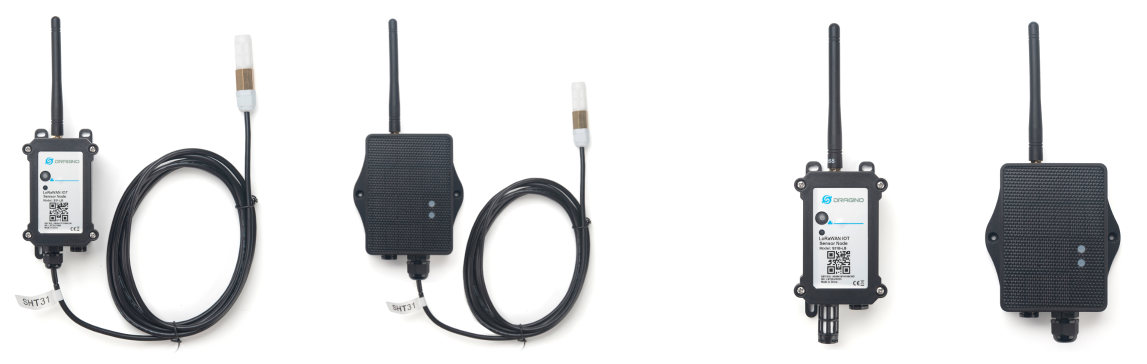
S31B-MS is a Dragino Mesh Node for monitoring ambient temperature and relative humidity. It uses an SHT31 sensor and sends the measurements to a Dragino Mesh gateway.
The node can communicate directly with the Mesh gateway or relay data through other Mesh Nodes. It is suitable for environmental monitoring projects that require long-range coverage, have difficult site cabling, or contain locations where a direct wireless path is obstructed.
1.2 Features
- SHT31 digital temperature and humidity sensor.
- Waterproof and anti-condensation protection structure suitable for long-term environmental measurement.
- Multiple samples are filtered before reporting to reduce short-term fluctuations.
- LoRa Mesh communication with multi-hop relaying between nodes.
- S-type outdoor enclosure, solar panel, and 3000 mAh rechargeable lithium battery.
- Automatic periodic collection of temperature, humidity, and device status.
- Temperature, humidity, battery, and device status displayed on the Mesh gateway.
- Firmware upgrade support through USB serial or PC BLE.
1.3 Specifications
Common DC characteristics
| Item | Specification |
|---|---|
| Main unit operating voltage | Approximately 2.5 V to 3.6 V |
| Main unit operating temperature | -40 °C to 85 °C; battery operating temperature is subject to the battery specification |
Temperature sensor
| Item | Specification |
|---|---|
| Range | -40 °C to 80 °C |
| Accuracy | Typical ±0.2 °C; applicable conditions are subject to the SHT31 specification |
| Resolution | 0.1 °C |
| Long-term drift | Less than 0.03 °C/year |
Humidity sensor
| Item | Specification |
|---|---|
| Range | 0 to 99.9 %RH |
| Accuracy | Typical ±2 %RH; applicable conditions are subject to the SHT31 specification |
| Resolution | 0.1 %RH |
| Long-term drift | Less than 0.25 %RH/year |
Mesh main unit
| Item | Specification |
|---|---|
| MCU | STM32WLE5, 48 MHz ARM Cortex-M4 |
| Flash | 256 KB |
| RAM | 64 KB |
| Radio | STM32WLE5 integrated sub-GHz LoRa radio |
| Power supply | Solar panel + 3000 mAh rechargeable lithium battery |
| Local interfaces | 3.3 V UART, BLE |
| Antenna | Sub-GHz LoRa antenna matching the shipping Region |
1.4 Applications
- Environmental monitoring for farmland, greenhouses, nurseries, and livestock facilities.
- Environmental monitoring for warehouses, cold storage, and material storage areas.
- Temperature and humidity monitoring in parks, buildings, and equipment rooms.
- Auxiliary weather monitoring and outdoor environmental data collection.
- Remote monitoring points requiring solar power and multi-hop wireless coverage.
1.5 Sleep Mode and Working Mode
In the sleep state, the node disables most functions and remains in low-power standby until its next scheduled wake-up or a user action wakes it.
After enrollment, the normal working cycle is:
Reach scheduled time -> Wake up -> Collect and process temperature and humidity
                     -> Send data to the Mesh gateway
                     -> Wait for a short communication window -> Sleep
While the node is asleep, it cannot receive or relay data in real time. Mesh coverage therefore depends on node wake-up times as well as gateway coverage, installation position, antenna height, and obstructions.
1.6 Button Operations and LED Status
Button operations and LED indications are common to Dragino Mesh Nodes. See 3.1 Button Operations and LED Status in the Mesh Quick Start for everyday operations. For factory reset, manual sleep, and Bootloader entry, see How to Use Advanced Button Operations.
1.7 BLE and Local Interfaces
S31B-MS provides 3.3 V UART and BLE local interfaces. BLE can be used for normal APP firmware updates from a PC through PC BLE in FirmwareUpdateUtility.
The mobile upgrade workflow is still under development.
1.8 Enclosure and Mechanical Reference
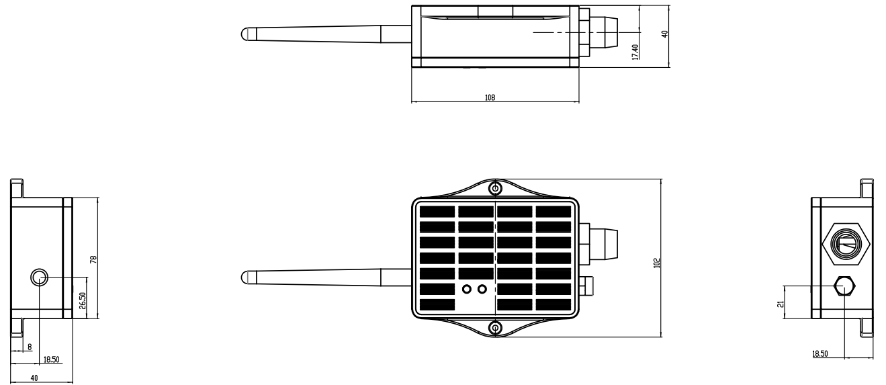
The following figures show the LA66S Mesh module pin definitions and the solar enclosure dimensions, mounting points, and cable outlets used by S31B-MS.
Pin definitions
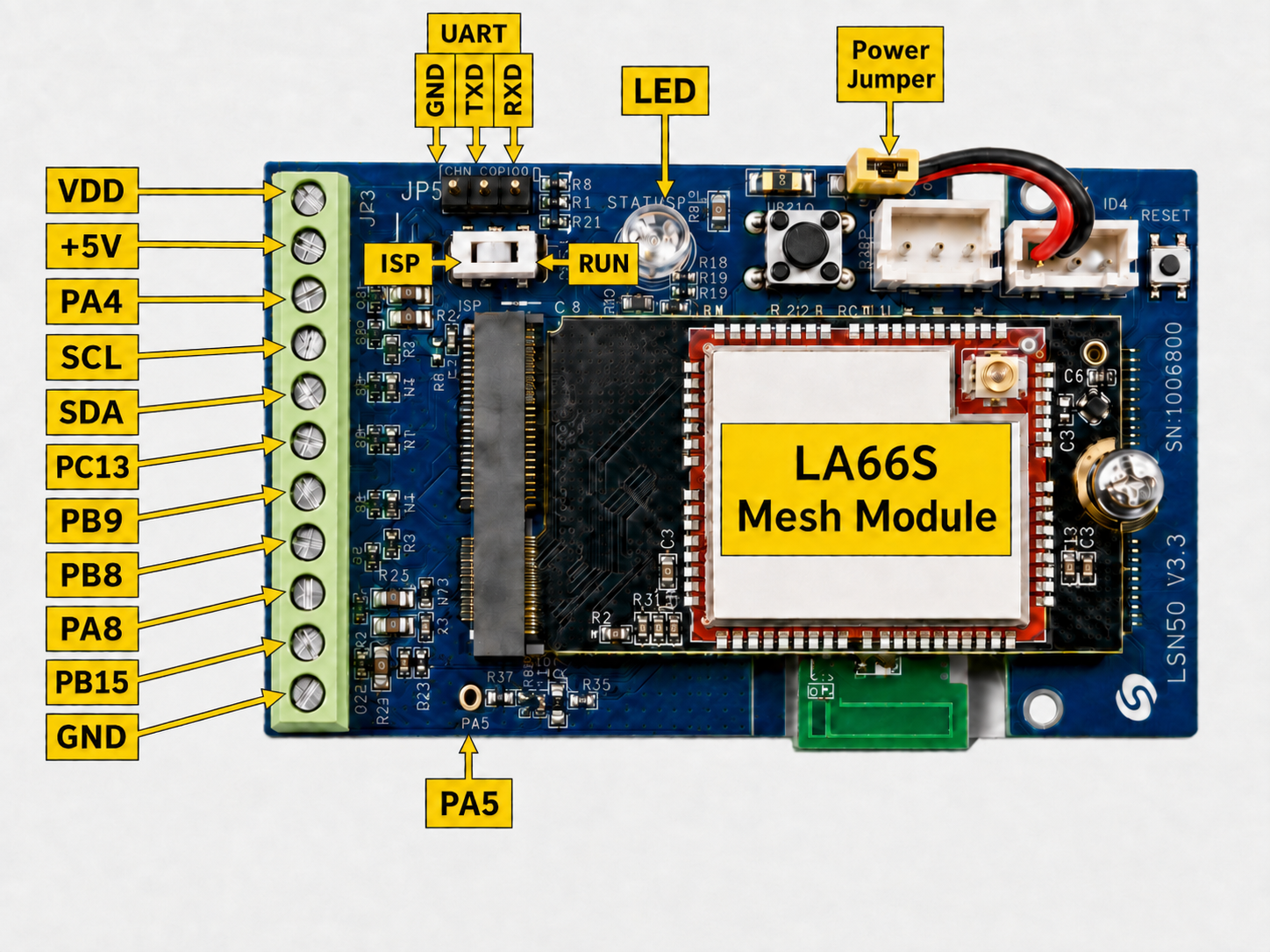
On the LSN50V3 base board, some silkscreen pin names differ from the STM32 pin names used in firmware. See How Board Pins Map to STM32 Pins Used in Firmware.
Solar enclosure dimensions and mounting reference
1.9 Understanding Temperature and Humidity Measurements
After waking, the device obtains multiple temperature and humidity samples, filters and processes the valid samples, and then sends stable measurements to the Mesh gateway. This reduces the effect of individual reading fluctuations or brief interference.
The sensor requires a short time to obtain stable data, so values may not appear immediately after a manual report is triggered. If a reading fails, the device retries sampling. If valid data cannot be obtained continuously, the gateway displays a sensor error or indicates that no valid temperature and humidity data are available.
Measurement conditions affect the result:
- Direct sunlight can cause the measured temperature to be higher than the actual air temperature.
- A wall, metal surface, or heat-generating device can influence the reading.
- Condensation, water droplets, dust, and oil contamination can slow humidity response.
- Inadequate airflow may prevent readings from representing the surrounding environment.
- After moving between significantly different environments, allow the sensor time to stabilize.
1.10 Installation Requirements
- Install the sensor where air can circulate naturally.
- Avoid direct sunlight. If necessary, add a ventilated sun shield.
- Do not place the sensor directly against the enclosure, a wall, pipe, or other heat source.
- Avoid condensation outlets, continuous water flow, and locations where the sensor may be covered by soil.
- Do not allow oil, paint, or chemical solvents to contact the sensor protection structure.
After installation, trigger a new report and confirm that temperature and relative humidity appear on the Mesh gateway. Verify that the values are plausible for the site conditions.
2. Mesh Operation
2.1 How It Works
The node can communicate directly with a Mesh gateway or relay its data through other awake Mesh Nodes.
After enrollment, S31B-MS follows the reporting schedule provided by the Mesh gateway. During each cycle, it collects and processes temperature and humidity, sends the current values, waits briefly for pending Mesh configuration, and then returns to low-power sleep.
After sampling is complete, the Mesh gateway displays:
- Temperature.
- Relative humidity.
- Battery level or battery status.
- Device online and operating status.
- Data update time.
Display names and page layout depend on the Mesh gateway version.
2.2 Product-Specific Verification
Complete the general enrollment and first-report procedure in the Mesh Quick Start before final installation. Allow the sensor sampling cycle to finish before judging the first readings.
| Stage | Verify | Expected result |
|---|---|---|
| Sensor response | Temperature and relative humidity after a complete sampling cycle | Both values appear without a sensor error or invalid-data indication |
| Measurement conditions | Sunlight, nearby walls or metal, airflow, condensation, dust, and oil contamination | The installation does not introduce an obvious environmental bias |
| Plausibility check | The reported values against the local conditions or a suitable reference | Temperature and humidity are reasonable for the site and the sensor has had time to stabilize |
| Final installation | A new report after mounting the sensor | The values remain plausible and the outdoor cable and enclosure are secure |
2.3 Mesh Payload
S31B-MS sends its business payload to the Mesh gateway on Mesh application port 290. Port 287 is used for configuration and administration messages and is not part of this sensor payload.
The common 14-byte header is documented in 2.4 Mesh Business Data. This section defines the DATA block for S31B-MS.
S31B-MS uses data_type = 0x01. The DATA block is 7 bytes, so the complete payload is 21 bytes. Multi-byte values are little-endian.
DATA Structure
DATA offset | Field | Format | Interpretation |
|---|---|---|---|
| 0–1 | battery_mv | uint16 LE | Battery voltage in mV; 0 = invalid |
| 2 | battery_percent | uint8 | Battery level 0–100; 0xFF = invalid |
| 3–4 | temperature_c_x10 | int16 LE | Raw value / 10 = °C; 32767 = invalid |
| 5–6 | humidity_rh_x10 | uint16 LE | Raw value / 10 = % RH; 65535 = invalid |
3. Configure S31B-MS
3.1 Configuration Method
Common Mesh configuration is managed through the Mesh gateway. Use the Mesh Quick Start for the current configuration and enrollment workflow.
Product-specific command configuration is not currently available for S31B-MS.
3.2 Region and Radio Parameters
Each unit ships with a fixed Region and LoRa parameters set during manufacturing. The Mesh gateway and node must use the same Region.
3.3 Scheduled and Manual Reporting
After enrollment, the node follows the wake-up and reporting schedule provided by the Mesh gateway.
To request an immediate update:
- Wake the node if it is sleeping.
- While it is active, hold the button and release it within 1 to 3 seconds.
- Wait for the sampling cycle to complete.
- Confirm that the new values and update time appear on the Mesh gateway.
4. Battery & Power Consumption
Battery performance depends on the reporting interval, Mesh coverage, relay conditions, sunlight, solar-panel orientation, ambient temperature, and battery condition. Short reporting intervals increase the number of sampling and radio-transmission cycles.
S31B-MS uses a solar panel and a 3000 mAh rechargeable lithium battery.
Battery Info & Power Consumption Analyze.
5. Firmware Update
Use only APP firmware built for S31B-MS and the device's shipping Region.
For the firmware preparation and upload procedure, see 2. How to upload the firmware.
The mobile upgrade feature is still under development.
6. FAQ
6.1 Why is the node enrolled but no temperature or humidity data appear?
Wake the node and trigger a manual report. Allow the complete sampling cycle to finish before checking the gateway. If no data appear, inspect the sensor connection and confirm that the installed firmware matches S31B-MS.
6.2 How should abnormal temperature or humidity readings be checked?
- For high temperature, check direct sunlight, nearby heat sources, walls, metal surfaces, and ventilation.
- For slow humidity response, inspect the protection structure for condensation, droplets, dust, or contamination.
- After moving the sensor between different environments, allow enough time for the reading to stabilize.
6.3 How should S31B-MS be maintained?
- Keep the solar panel clean and unobstructed.
- Inspect the antenna, waterproof connectors, cables, and enclosure mounting.
- Keep the sensor protection structure clean and ventilated.
- Do not clean the sensor directly with a high-pressure water jet.
- For projects requiring high measurement consistency, compare the device with a reference instrument according to the project maintenance schedule.
For enrollment, Region, gateway connectivity, general power, or firmware-update questions, see the general Mesh FAQ.
7. Order Info
Ordering details and Region-specific part numbers for S31B-MS will be added when the product options are finalized.
8. Packing Info
Package contents, dimensions, and weights for S31B-MS will be added in a future documentation update.
9. Support
Dragino support is available Monday to Friday from 09:00 to 18:00 GMT+8. When requesting assistance, provide the product model, firmware identification, Region, a precise description of the problem, and the steps required to reproduce it.
Contact: Support@dragino.cc