Set Uplink Dwell Time
1. Introduction
This chapter introduces how users can change the uplinkdwell time.
2. Default uplinkdwelltime
Take AS923 frequency band as an example. We can see the spread spectrum factor corresponding to the data rate.
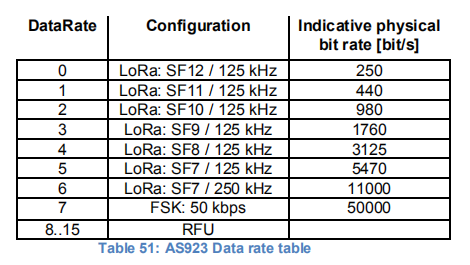
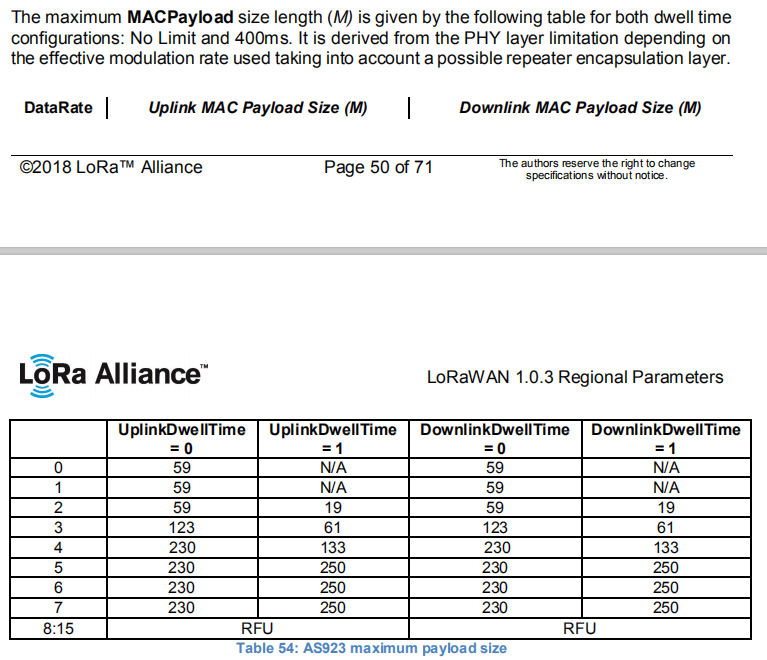
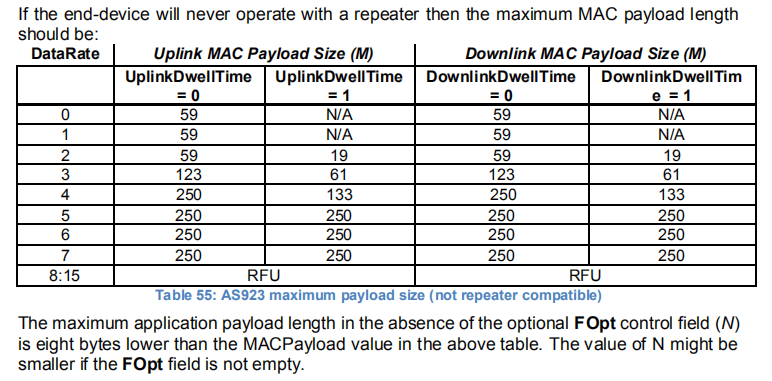
The device default uplinkdwelltime=1, there are SF7, SF8, SF9 and SF10.
If users want to ues SF11 and SF12, they need to set uplinkdwelltime=0.
Users can use AT commands to set uplinkdwell time.
3. Use AT command to set uplinkdwell time
Since Dragino LoRaWAN Stack DR_LWS_005, user is able to set the uplink Dwelltime in AS923 and AU915 manual or use a application side downlink command to set it.
-
Use AT command:
AT+DWELLT=0, set to Uplink Dwelltime=0. -
Use AT command:
AT+DWELLT=1, set to Uplink Dwelltime=1.
Or via application downlink command:
- Downlink Payload: 0x2500, Set
AT+DWELLT=0to uplink. - Downlink Payload: 0x2501, Set
AT+DWELLT=1to uplink.