How to Connect to the Enterprise Network
1. Introduction
Gateways can connect to WPA/WPA2 networks
What does the user need to prepare: The gateway accesses the network normally(Please access the network through other means, such as a WAN port )
Connect to the gateway's Linux command line via SSH
2. Connect to the gateway's Linux command line
User can use Putty or CRT as connection tools and see usermanual's How to connect to the Linux command line via ssh
2.1 Step 1: Install the luci package
Please use the opkg update;opkg install luci --force-overwrite command to install luci package
root@dragino-1e9674:~# opkg update;opkg install luci --force-overwrite
Downloading https://downloads.openwrt.org/releases/18.06.8/targets/ar71xx/generic/packages//Packages.gz
Updated list of available packages in /var/opkg-lists/openwrt_core
Downloading https://downloads.openwrt.org/releases/packages-18.06/mips_24kc/base//Packages.gz
Updated list of available packages in /var/opkg-lists/openwrt_base
Downloading https://downloads.openwrt.org/releases/packages-18.06/mips_24kc/luci//Packages.gz
Updated list of available packages in /var/opkg-lists/openwrt_luci
Downloading https://downloads.openwrt.org/releases/packages-18.06/mips_24kc/packages//Packages.gz
Updated list of available packages in /var/opkg-lists/openwrt_packages
Downloading https://downloads.openwrt.org/releases/packages-18.06/mips_24kc/routing//Packages.gz
Updated list of available packages in /var/opkg-lists/openwrt_routing
Downloading https://downloads.openwrt.org/releases/packages-18.06/mips_24kc/telephony//Packages.gz
Updated list of available packages in /var/opkg-lists/openwrt_telephony
Downloading http://www.dragino.com/downloads/downloads/LoRa_Gateway/DLOS8/Firmware/Packages/dragino//Packages.gz
Updated list of available packages in /var/opkg-lists/dragino
Installing luci (git-20.356.64372-1259bb1-1) to root...
Downloading https://downloads.openwrt.org/releases/packages-18.06/mips_24kc/luci//luci_git-20.356.64372-1259bb1-1_all.ipk
Installing luci-lib-ip (git-20.356.64372-1259bb1-1) to root...
Downloading https://downloads.openwrt.org/releases/packages-18.06/mips_24kc/luci//luci-lib-ip_git-20.356.64372-1259bb1-1_mips_24kc.ipk
Installing luci-base (git-20.356.64372-1259bb1-1) to root...
Downloading https://downloads.openwrt.org/releases/packages-18.06/mips_24kc/luci//luci-base_git-20.356.64372-1259bb1-1_mips_24kc.ipk
Installing luci-mod-admin-full (git-20.356.64372-1259bb1-1) to root...
Downloading https://downloads.openwrt.org/releases/packages-18.06/mips_24kc/luci//luci-mod-admin-full_git-20.356.64372-1259bb1-1_mips_24kc.ipk
Installing luci-theme-bootstrap (git-20.356.64372-1259bb1-1) to root...
Downloading https://downloads.openwrt.org/releases/packages-18.06/mips_24kc/luci//luci-theme-bootstrap_git-20.356.64372-1259bb1-1_all.ipk
Installing luci-app-firewall (git-20.356.64372-1259bb1-1) to root...
Downloading https://downloads.openwrt.org/releases/packages-18.06/mips_24kc/luci//luci-app-firewall_git-20.356.64372-1259bb1-1_all.ipk
Installing luci-proto-ppp (git-20.356.64372-1259bb1-1) to root...
Downloading https://downloads.openwrt.org/releases/packages-18.06/mips_24kc/luci//luci-proto-ppp_git-20.356.64372-1259bb1-1_all.ipk
Installing luci-proto-ipv6 (git-20.356.64372-1259bb1-1) to root...
Downloading https://downloads.openwrt.org/releases/packages-18.06/mips_24kc/luci//luci-proto-ipv6_git-20.356.64372-1259bb1-1_all.ipk
Configuring luci-lib-ip.
Configuring luci-theme-bootstrap.
uci: Entry not found
uci: Parse error (too many arguments) at line 22, byte 43
Configuring luci-app-firewall.
Configuring luci-proto-ppp.
Configuring luci-base.
Configuring luci-mod-admin-full.
uci: Entry not found
uci: Parse error (too many arguments) at line 22, byte 43
Configuring luci-proto-ipv6.
Configuring luci.
root@dragino-1e9674:~#
2.2 Step 2: Install the wpad package
Please use the opkg remove wpad-mini;opkg install wpad command to wpad package
root@dragino-1e9674:~# opkg remove wpad-mini;opkg install wpad
Removing package wpad-mini from root...
Installing wpad (2018-05-21-62566bc2-8) to root...
Downloading https://downloads.openwrt.org/releases/packages-18.06/mips_24kc/base//wpad_2018-05-21-62566bc2-8_mips_24kc.ipk
Configuring wpad.
root@dragino-1e9674:~# reboot
root@dragino-1e9674:~#
3. Connect to the Enterprise network
3.1 Step 1: Enter the luci Web and wireless page
User can use the IP address of the gateway(as 10.130.1.1/IP:8000) followed by /luci to enter the luci page
as 10.130.1.1/cgi-bin/luci or adress IP:8000/cgi-bin/luci

Enter luci page
3.2 Step 2: Select the connection to Enterprise network
User can enable the WIFI client and edit it with the WPA2-EAP model.
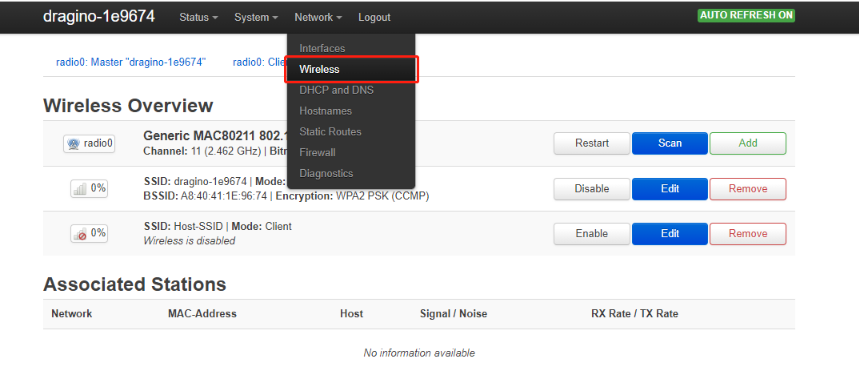
Select wireless page
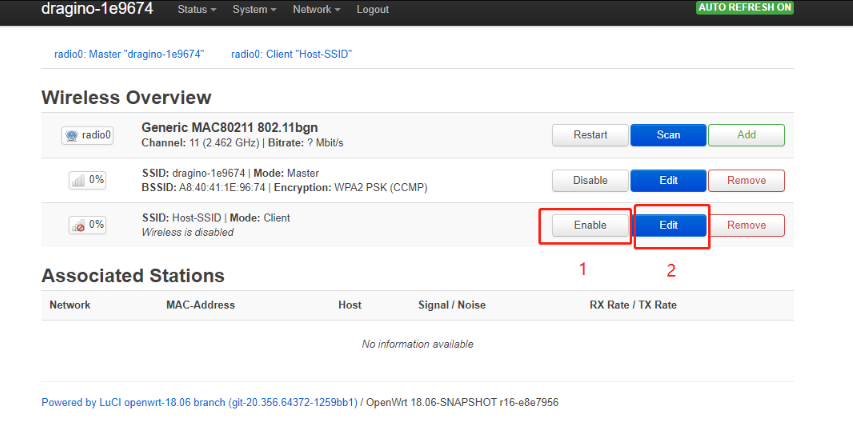
Enable&edit
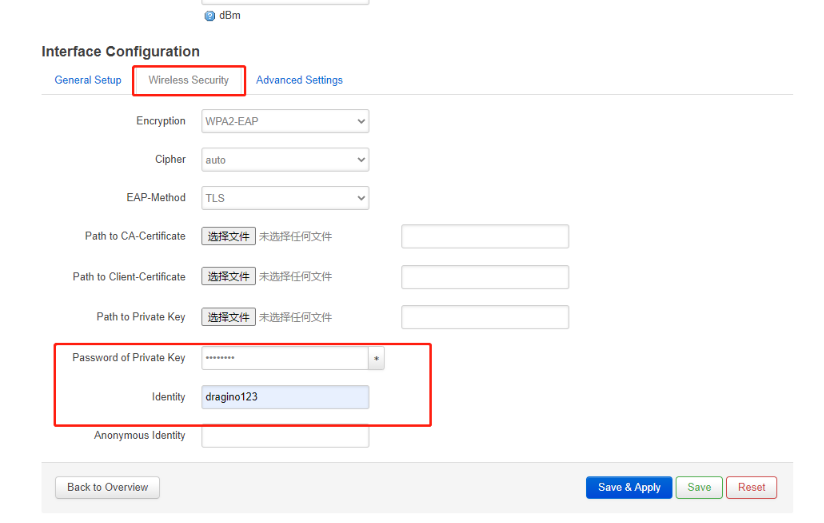
Edit luci WPA2-EAP network
Note : If user's enterprise network no certificate required,user only input the username and passwd to Save&Apply.