Signal Issue: CSQ:99,99
1. Issue Output
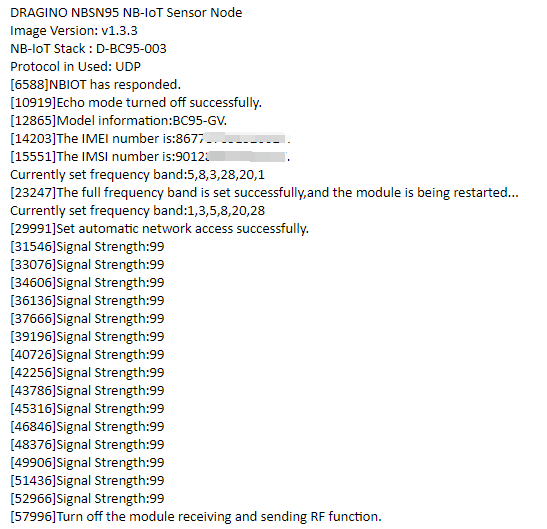
NB-IoT module can't connect to NB-IoT Network and Keep Showing Signal Strenght:99. Below is an example output:
2. What is Signal Strenght?
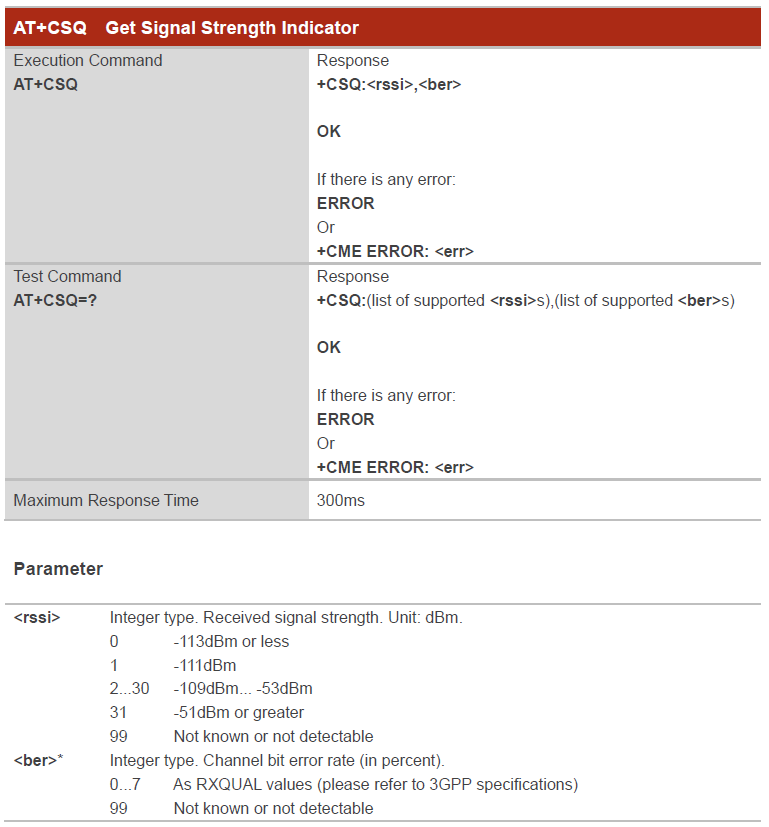
Signal Strength is same as AT+CSQ command output. When you run AT+CSQ and NB-IoT module return AT+CSQ=99,99. It means NB-IoT Sensor doesn't attached to the NB-IoT network. If attached to network, the first 99 should be 2~31.
Below is the definition for the AT+CSQ:
CSQ Definition
3. What to check?
3.1 Check whether module detect the SIM card?
You can see if the output shows the IMSI number. If NB-IoT module detects SIM card successful, There will be a IMSI number shown, this is from the SIM card. If SIM card not detect, please check:
-
If SIM card is placed in correct direction.
-
Make sure there is power off / power on after insert SIM card.
3.2 Whether you use a NB-IoT SIM card that the module supports
-
Make sure the SIM card you use is a NB-IoT SIM card. It is different from normal SIM card we use for mobile.
-
If you use a NB-IoT SIM card, check whether the Frequency Band of this operator are in the support list of the NB-IoT Sensor.
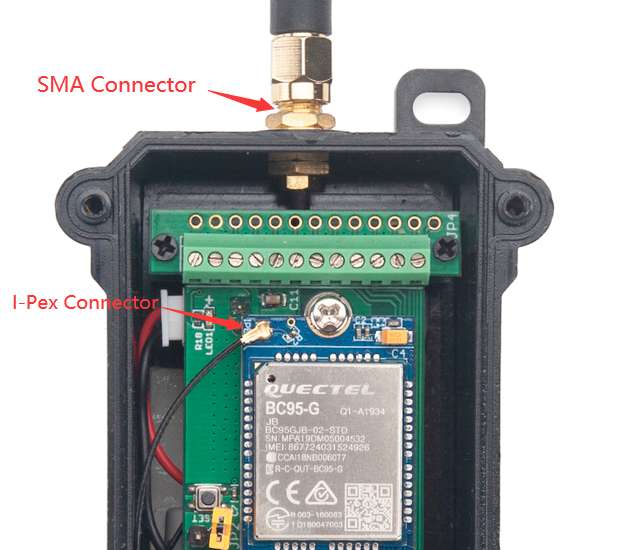
3.3 Whether the antenna connection is good
See the connection of Antenna Path is loose.
3.4 Check Software Settings
In the NB-IoT Sensor which power by battery. The sensor will try to connect to NB-IoT in a specify time (For example 5 minutes), if sensor is not able to attach network in 5 minutes. Sensor will stop retry and put the NB-IoT module in sleep mode to save battery life. So in the case that attaching network needs more time than 5 minutes, it will cause module hard to attach NB-IoT network. There are two solution to solve this.
3.4.1 Extend attach time
User can use AT Command to extend network acquisition time.
For example, AT+CSQTIME=10 will extend the network acquisition time to 10 minutes.
3.4.2 Lock Frequency Band
NB-IoT module by default support multi-bands, and it will try to use these bands to attached network one by one. User can lock the frequency band to the SIM card band to speed up the process.