Add Location Data on Uplink Packet
Add Location Data on Uplink Packet
1. Modules with built-in GPS functionality
- CB module, i.e., the BG95-NGFF module.
- FB module, i.e., the NRF9151-NGFF module.
2. GPS Feature Description
- For BG95-M2 module
Multi-constellation support: GPS / GLONASS / BDS / Galileo / QZSS.
Integrated Communication and Positioning: A single module handles both LTE-M/NB-IoT data reporting and GNSS location data collection.
Ideal for Low-Power IoT: The combination of LTE-M/NB-IoT and GNSS is suitable for battery-powered devices or scenarios requiring periodic data reporting.
Compatible with Base Station Positioning: The BG95 series also supports QuecLocator base station positioning, which serves as a supplementary positioning method when GNSS is unavailable.
- For NRF9151-NGFF module
Supported satellite systems: GPS L1 C/A, QZSS L1 C/A.
Operating modes: Single positioning, fixed-interval positioning, continuous tracking.
Low-power capabilities: Supports continuous tracking with duty cycle control, suitable for battery-powered devices.
Time synchronization: Supports 1PPS output, suitable for UTC synchronization at the second level.
Note: Since the FE series is designed for indoor use, it does not come with a GPS antenna by default.
3. Command Configuration
By default, the GPS feature is turned off; users must enable GPS location services themselves.
3.1 For BG95-M2 Module
3.1.1 Set GNSS open time
Extend the time to turn on GNSS. The automatic GPS location time is extended when the node is activated.
- The default configuration is: AT+GNSST=60, which means the total positioning duration is 60 seconds.
AT Command: AT+GNSST
Example: AT+GNSST=30 // Set the GPS positioning time to 30 seconds
Downlink command: 0x10
Format: Command Code (0x10) followed by 2 bytes.
Example: Downlink Payload: 10 00 1E// AT+GNSST=30
3.1.2 Turn on/off GPS
The default configuration is: AT+GPS=0, which means that the GPS feature is disabled by default and must be enabled by the user.
AT Command: AT+GPS
Ex1: AT+GPS=0 // Turn off GPS
Ex2: AT+GPS=1 // Turn on GPS
Downlink command: 0x11
Format: Command Code (0x11) followed by 1 byte.
Example: Downlink Payload: 11 01// AT+GPS=1
3.1.3 Set GPS positioning interval
Feature: Set GPS positioning interval (unit: hour).
When GPS is enabled, the node automatically locates and uplinks each time it passes GTDC time after activation.
The default configuration is: AT+GTDC=24, which means that, by default, the GPS function is activated once every 24 hours.
AT Command: AT+GTDC
Example: AT+GTDC=24 // Set the GPS positioning interval to 24h.
Downlink command: 0x12
Format: Command Code (0x12) followed by 3 bytes.
Example: 24 hours: 24(D)=0x18(H)
Downlink Payload: 12 00 00 18// AT+GTDC=24
3.2 For NRF9151-NGFF module
3.2.1 Set GNSS open time
Extend the time to turn on GNSS. The automatic GPS location time is extended when the node is activated.
- The default configuration is: AT+GTIME=60, which means the total positioning duration is 60 seconds.
AT Command: AT+GTIME
Example: AT+GTIME=30 // Set the GPS positioning time to 30 seconds
Downlink command: 0x10
Format: Command Code (0x10) followed by 2 bytes.
Example: Downlink Payload: 10 00 1E// AT+GTIME=30
3.2.2 Turn on/off GPS
The default configuration is: AT+QGPS=0, which means that the GPS feature is disabled by default and must be enabled by the user.
AT Command: AT+QGPS
Ex1: AT+GPS=0 // Turn off GPS
Ex2: AT+QGPS=1 // Turn on GPS
Downlink command: 0x11
Format: Command Code (0x11) followed by 1 byte.
Example: Downlink Payload: 11 01// AT+QGPS=1
3.2.3 Set GPS positioning interval
Feature: Set GPS positioning interval (unit: hour).
When GPS is enabled, the node automatically locates and uplinks each time it passes QGTDC time after activation.
The default configuration is: AT+QGTDC=24, which means that, by default, the GPS function is activated once every 24 hours.
AT Command: AT+QGTDC
Example: AT+QGTDC=24 // Set the GPS positioning interval to 24h.
Downlink command: 0x12
Format: Command Code (0x12) followed by 3 bytes.
Example: 24 hours: 24(D)=0x18(H)
Downlink Payload: 12 00 00 18// AT+QGTDC=24
4. GPS Power Consumption
When the GPS function is enabled, the power consumption associated with GPS positioning is added to the overall baseline power consumption.
The power consumption figures below are based on the default positioning duration of 60 seconds.
4.1 For BG91-M2 module
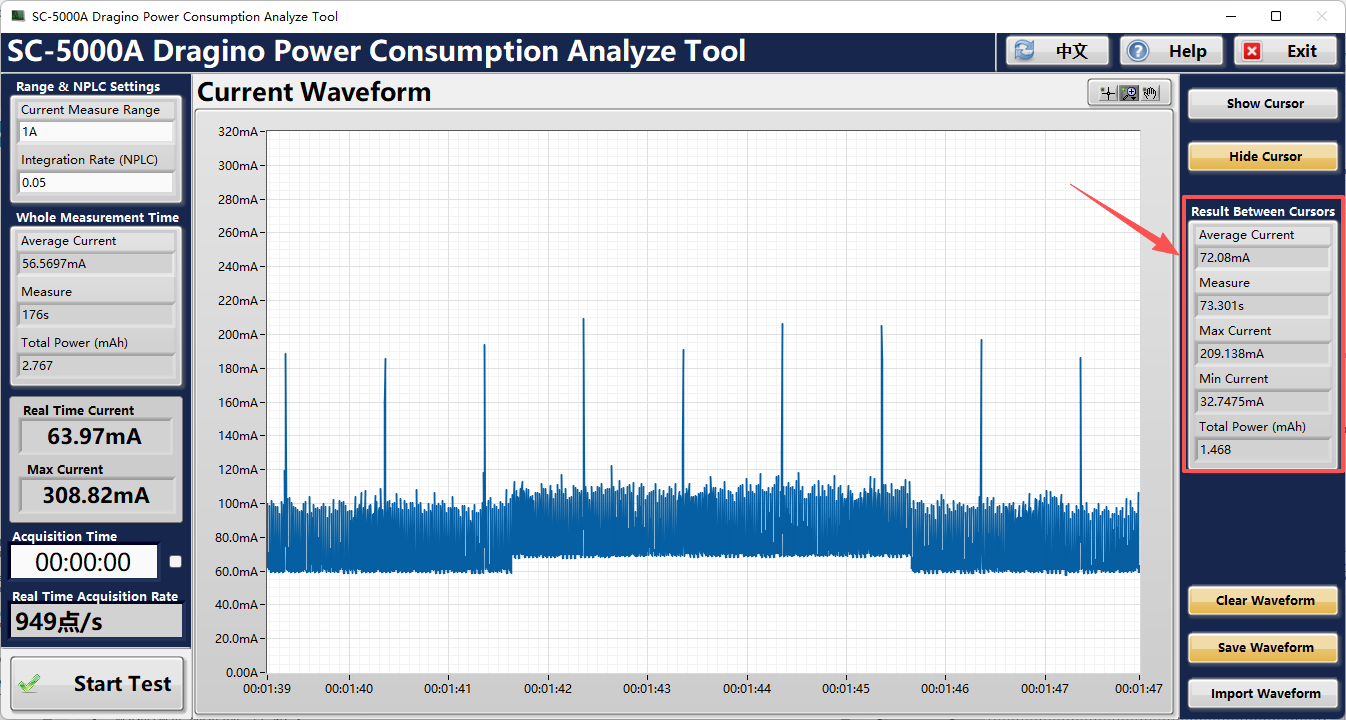
Note: Because the BG95-M2 module needs to execute internal commands to enable the GPS function when it is activated, the total time required for positioning will be slightly longer than the configured time.
- Average Current: 72.08 mA
- Measurement Duration: 73.301 s
- Maximum Current: 209.138 mA
- Total Power: 1.468 mAh
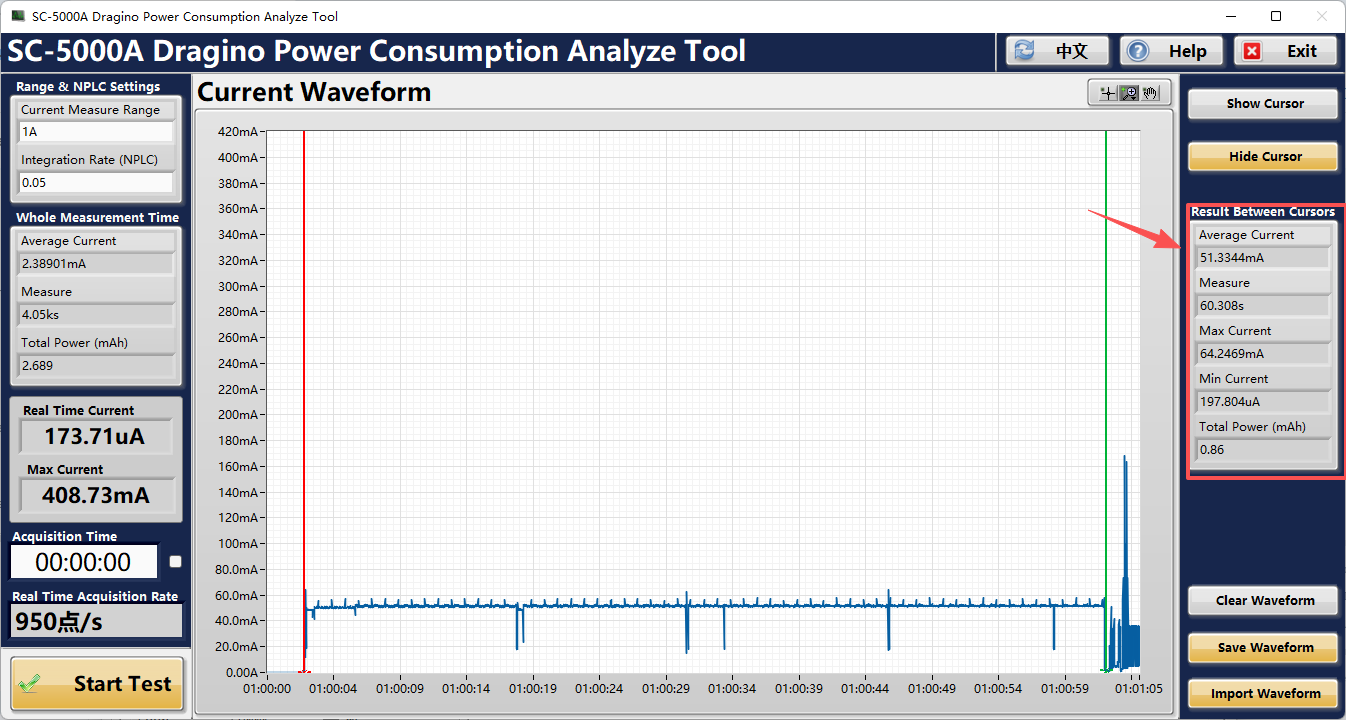
4.2 For NRF9151-NGFF module
- Average Current: 51.3344 mA
- Measurement Duration: 60.308 s
- Maximum Current: 64.2469 mA
- Total Power: 0.86 mAh